I am reading a config sheet, and based on the values present there, i'm trying to open an excel with corresponding values. pls help me
Hi @vencric without example workflow/ files it is a challenge to aide best, have you tried the Dynamic Input tool: https://help.alteryx.com/20213/designer/dynamic-input-tool Happy solving 😄
Joe
Hi @vencric
Can you provide some sample input and expected output it will help us get a better understanding of the usecase.
You can give this blog a try. Instead of using a directory tool you can directly pass the filenames.
https://community.alteryx.com/t5/Alteryx-Designer-Knowledge-Base/The-Ultimate-Input-Data-Flowchart/ta-p/20480
Hope this helps : )
Thanks @JOEHERBERT . Actually, in a config sheet i'll have two columns named Program and CAdence .
Ex Program Cadence
ABC No
DEF Yes
So, I have to to open an excel file named DEF.xlsx
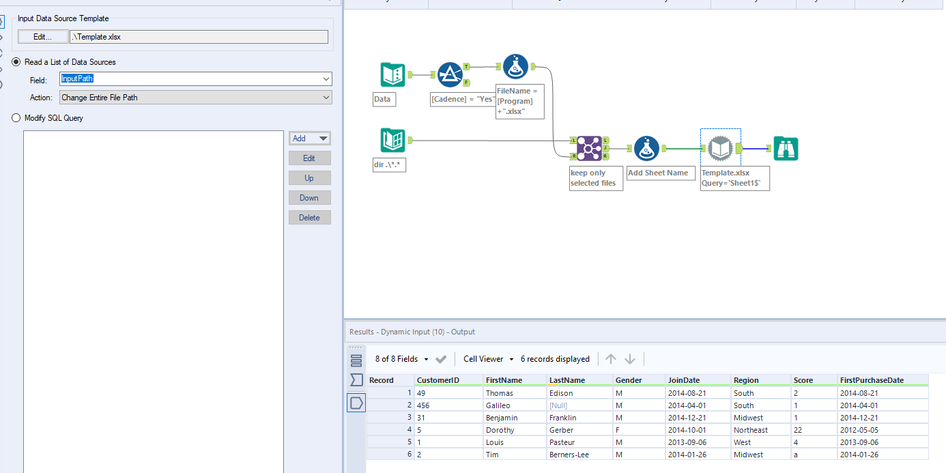
Hi @vencric I think you could use iput tool pointing to the config, then a filter to bring back Cadence= Yes, then a dynamic input to bring back the relevant file paths and open up:
Does this help? Joe
Like..
GHI Yes
JKL No
MNO Yes..
So, i have to open DEF.xlsx, process and compute and store the output, then select GHI, then MNO like that..
You can do something like below.
Workflow:
Please refer to blog 2nd method to get a better understanding https://community.alteryx.com/t5/Alteryx-Designer-Knowledge-Base/The-Ultimate-Input-Data-Flowchart/ta-p/20480
Hi atcodedog05.. Thanks for the solution...I'm able to proceed but getting below error : has a different schema than the 1st file.. But all files are having same columns and datatypes
This issue occurs even if when there is a slight formatting issue. Please refer to blog 3rd method and adapt for your usecase it should work
https://community.alteryx.com/t5/Alteryx-Designer-Knowledge-Base/The-Ultimate-Input-Data-Flowchart/t...
i'm not able to do it.. 😞
can you pls help
Can you share snapshot of your workflow and issues you are facing ?
i'm facing the error in :has a different schema than the 1st file in the set
Did you try the 3rd method in this link
https://community.alteryx.com/t5/Alteryx-Knowledge-Base/The-Ultimate-Input-Data-Flowchart/ta-p/20480
i'm not able to understand what they meant..
No issues download the attached workflow, change the directory path to your required path, run the workflow and check whether it's working.
where can i use this one, after reading the input files ??
Thank You So much!!! i got it.its working fine... Now i have got one more requirement..... i.e, i have to write in excel stating that process is completed!!!! how can i proceed for it
Can you provide more info. Should completed be in a new column if yes use a formula set value as "completed" and write it. If not please provide me with more info on the requirement.
Yes... exactly.... something like
Ex Program Cadence Comments
DEF Yes Completed
GHI Yes Completed
MNO Yes.. Completed
You can use IF formula like below.
but i can do it , only if the programs were run successfully .. what if it got failed... Also now i'm getting an error
Hi atcodedog05, Actually is it possible to store the variable from an excel and pass it as parameterLike. Program CAdence Value
ABC Yes GHI
I have to pass "GHI" to another workflow as a parameter... pls let me know.. Thanks
Can you pls help on this
hi @atcodedog05 , is it possible to trigger the, Alteryx workflow using PEGA Openspan tool...any idea on how to trigger it for RPA purpose
As far as I know, I don't think you can trigger Alteryx workflow from other applications.
Thanks @atcodedog05 .. Regarding the comments to be updated as completed successfully i can use IIF Command , but , only if the programs were run successfully .. what if it got failed
If all were successful then the workflow will not throw error is not successful then the workflow will throw error has you experienced previously.
hi @atcodedog05 how to use excel files from Sharepoint
hi @atcodedog05 , how to work with mainframe application? like opening a .exe application