What my workflow does: My analytic app utilizes a batch macro to generate individual technical files for a list of part numbers provided by the user. The workflow extracts relevant product content from our company content database and the batch macro within the workflow formats the content for inclusion in a PDF that is then provided to an end customer. The raw product content is formatted for display on websites, and therefore it contains imbedded html tags. I found that the Report Text tool renders this imbedded html and I have created a batch macro the generates individual PDF files as required by my users.
Problem: The html code imbedded within the content is not always clean and when there is problematic html tags within the content the Report Text tool does not always render the PDF correctly. In those instances, the final PDF is generated but with only part on the product content included. I would like to use the workflow log data to generate an error report of the instances where the PDF is not complete and needs further review. I am looking for a solution on how to access the workflow log file or another method to identify these errors and generate the error report.
I have tried the Crew Runner tool, but it doesn't give me exactly what I need because it does not allow for users to input the workflow options using the various interface tools built into the complete tool. Cleaning up the html is also not feasible because of the volume of data (millions of records) that is managed in our system. This app must also run from the gallery.
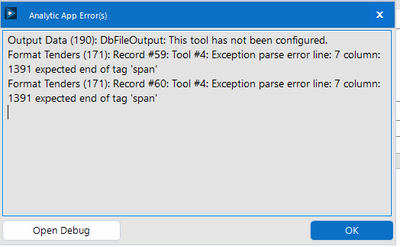
I want to the workflow to access this info:
The two circled tools within the batch macro are the two tools where I would want to capture any error messages generated.
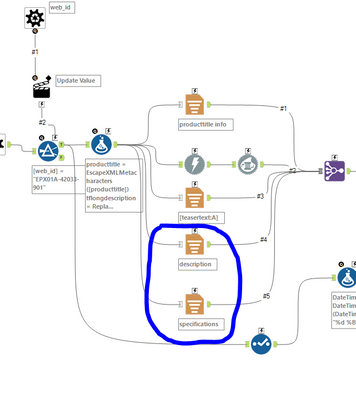
I have included the portion of the workflow relevant to this question and the batch macro. Any help or insights would be much appreciated.


