The Alteryx Community is a finalist in three 2026 CMX Awards! Help us win Customer Support Community, Most Engaged Community, and User Group Program of the Year - vote now! (it only takes about 2 minutes) before January 9.
ACT NOW: The Alteryx team will be retiring support for Community account recovery and Community email-change requests Early 2026. Make sure to check your account preferences in my.alteryx.com to make sure you have filled out your security questions. Learn more here
Start Free Trial

Alteryx Designer Desktop Discussions

Find answers, ask questions, and share expertise about Alteryx Designer Desktop and Intelligence Suite.

How do I combine this workflow into an existing workflow?

AshleyTolliver
6 - Meteoroid

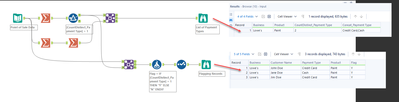
Now that I have identified my Payment Type Issues/Discrepancies, how do I add this to my current workflow and not filter out my other data? And also combine my formula's so I'm not just narrowing down my data, but I'm simply identifying within a current "Problem Statement" formula that there is also a discrepancy?
AshleyTolliver_0-1763484670864.png


3 REPLIES 3
Chaoued
8 - Asteroid

1. Keep All Records (Don’t Filter Out)
Instead of using a Filter tool, use a Formula tool to create a new field (exp : Payment_Discrepancy_Flag) that marks discrepancies without removing rows.


2. Combine with Existing "Problem Statement"
If you already have a field like [Problem_Statement] and want to append discrepancy info, you can concatenate conditions in the same Formula tool:


IF [CountDistinct_PaymentType] > 1 THEN
[Problem_Statement] + " | Payment Type Discrepancy"
ELSE
[Problem_Statement]
ENDIF


This ensures:

Your original problem statement stays intact.
Discrepancy info is added only when applicable.


3. Maintain Original Data + Add Flags
Your workflow should look like this:

Join/Aggregate → Summarize → Formula tool (add combined logic) → Output
No Filter tool needed.

AshleyTolliver
6 - Meteoroid

I am struggling with what that initial formula would look like

Pilsner
13 - Pulsar

Hello @AshleyTolliver,

Like @Chaoued has identified I believe you could achieve your desired result by removing the filter tool and instead ammending your formula, however seeing your current formula Im not sure of the exact ammendment required.

Another solution would be to use the union tool. By taking this approach you can keep all your current logic as is, but simply stack your data back together at the very end.

Please let me know how you get on. If you want to go down the formula route instead, please could you share your worklfow and Id be happy to help.

Regards - Pilsner

Labels
Top Solution Authors