In case you missed the announcement: The Alteryx One Fall Release is here! Learn more about the new features and capabilities here
ACT NOW: The Alteryx team will be retiring support for Community account recovery and Community email-change requests after December 31, 2025. Set up your security questions now so you can recover your account anytime, just log out and back in to get started. Learn more here
Start Free Trial

Alteryx Designer Desktop Discussions

Find answers, ask questions, and share expertise about Alteryx Designer Desktop and Intelligence Suite.
SOLVED

How can I change the Field Map labels in a macro?

csh8428
11 - Bolide

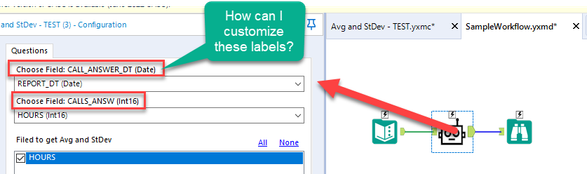
I have a macro that gets the avg and StDevs of a given field. I was wondering if there's a way to change the "Field Map Labels".


In the attached example I would want them to say "Pick a Date Field" and "Pick Field to get Avg and StDev" respectively.


screenshot2.png

Thanks for any help!

-Craig

2 REPLIES 2
SPetrie
13 - Pulsar

Those are the names of the fields you setup inside the macro input.

You would need to change those field names to be what you want it to show instead.

The field type is going to stick around through.

SPetrie_0-1662049111274.png

SPetrie_1-1662049148653.png


Thableaus
17 - Castor
17 - Castor

Hey @csh8428 


Bottom of line is that the labels and format can't be changed.


Once you pick this option, all fields that are part of the template will show up with this same label always - Choose Field: [Field] (DType)


Thanks,

Labels
Top Solution Authors