In case you missed the announcement: The Alteryx One Fall Release is here! Learn more about the new features and capabilities here
ACT NOW: The Alteryx team will be retiring support for Community account recovery and Community email-change requests after December 31, 2025. Set up your security questions now so you can recover your account anytime, just log out and back in to get started. Learn more here
Start Free Trial

Alteryx Designer Desktop Discussions

Find answers, ask questions, and share expertise about Alteryx Designer Desktop and Intelligence Suite.
SOLVED

Grouping of Data

nnishapillai
7 - Meteor

Hi,


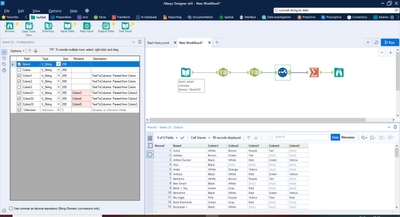
I have this data set (screenshot attached).


Now it is in the form:


Adidas      Green      Blue      Brown


I want it in the format 


Adidas   Green

Adidas    Blue

Adidas    Brown


Can someone pls help? 


Thanks.

Screenshot.png

3 REPLIES 3
DavidP
17 - Castor
17 - Castor

Use a Transpose tool and st the Adidas column as a key field.

grossal
15 - Aurora
15 - Aurora

HI @nnishapillai,


you can use the Transpose Tool.


grossal_0-1584780051801.png


And choose Brand as a key.


grossal_1-1584780070818.png


This results in:


grossal_2-1584780089702.png


I have added a Select Tool behind to remove the "Colors" columns.


Workflow attached. Let me know if it helps.


Alex

nnishapillai
7 - Meteor

That was awesome, Alex. It worked just perfect. Thanks a lot.
Labels
Top Solution Authors