In case you missed the announcement: The Alteryx One Fall Release is here! Learn more about the new features and capabilities here
ACT NOW: The Alteryx team will be retiring support for Community account recovery and Community email-change requests after December 31, 2025. Make sure to check your account preferences in my.alteryx.com to make sure you have filled out your security questions. Learn more here
Start Free Trial

Alteryx Designer Desktop Discussions

Find answers, ask questions, and share expertise about Alteryx Designer Desktop and Intelligence Suite.
SOLVED

Formula issue - Add columns with number and a space

Francesco07
6 - Meteoroid

Dears, 


I'm trying to replicate the below formula in the designer without success.


D1&" "&C1


D1 is 1, C1 is 2020. Result has to be: 1 2020


I'm trying to do in Alteryx:  D1 + " " + C1 but it doesn't work and it doesn't read the formula.
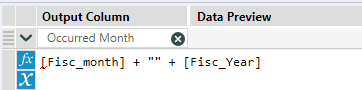
 

Francesco07_0-1589209797861.png


How do I solve it?

Thanks a lot for your support

4 REPLIES 4
Aaron_Harter
11 - Bolide

@Francesco07


Your fields are likely a numeric data type, try wrapping each field in the ToString expression:


ToString([fisc_month]) + " " + ToString([fisc_year])

patrick_digan
17 - Castor
17 - Castor

@Francesco07 you may need 2 changes, first you'll want to use tostring([Fisc_month]) and tostring([fisc_year]) assuming they're numbers. Then you'll also want to include a space between your quotes.


tostring([fisc_month]) + " " + tostring([Fisc_Year])

Jonathan-Sherman
15 - Aurora
15 - Aurora

Hi @Francesco07,


The issue is most likely they aren't both strings, try:


ToString([Fisc_month]) + " " + ToString([Fisc_Year])


If this solves your issue please mark the answer as correct, if not let me know!


Regards,

Jonathan

Francesco07
6 - Meteoroid

Thanks to all guys to the quick and successfull feedback!

I really appreciated!

Issue is solved

Labels
Top Solution Authors