In case you missed the announcement: The Alteryx One Fall Release is here! Learn more about the new features and capabilities here
ACT NOW: The Alteryx team will be retiring support for Community account recovery and Community email-change requests after December 31, 2025. Set up your security questions now so you can recover your account anytime, just log out and back in to get started. Learn more here
Start Free Trial

Alteryx Designer Desktop Discussions

Find answers, ask questions, and share expertise about Alteryx Designer Desktop and Intelligence Suite.
SOLVED

Formula Tool - comparing if two columns have values

PDS4545
5 - Atom

Hello


Is there a formula to compare if column 1 has a value and if column 2 has a value then output True in a new column or else output False.


A couple of additional items to keep in mind is that data types are different in both columns so i am not doing if column 1 equals column 2. and column 1 has dates in multiple formats. I have created column 2 to standardize the date formats but want to do a check that if column 1 has a value then i need column 2 to have a value as well.


Thank you in advance.

3 REPLIES 3
usmanbashir
11 - Bolide

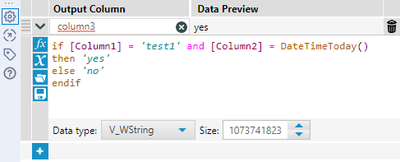
@PDS4545  - Yeah you can use the formula tool. Example would be:

2024-03-26_10-24-46.png

result:

2024-03-26_10-25-16.png

 Hope that helps!

danilang
19 - Altair
19 - Altair

Hi @PDS4545 


If you're trying to see if the two columns have any value as opposed to a specific value then use


If not IsEmpty([Column1]) and not IsEmpty([column2]) then

   True

Else

   False

Endif


Dan

PDS4545
5 - Atom

This worked. Thank you so much!

Labels
Top Solution Authors