ACT NOW: The Alteryx team will be retiring support for Community account recovery and Community email-change requests Early 2026. Make sure to check your account preferences in my.alteryx.com to make sure you have filled out your security questions. Learn more here
Start Free Trial

Alteryx Designer Desktop Discussions

Find answers, ask questions, and share expertise about Alteryx Designer Desktop and Intelligence Suite.
SOLVED

Find the previous months for a fix month

wendyzjy
8 - Asteroid

wendyzjy_0-1677232119774.png

hi Experts,

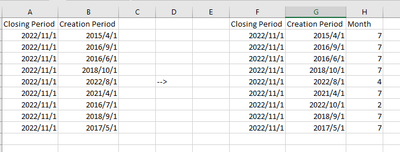
Closing Period is a fix date. I want to create a Month field to get the closest 6 months from closing period. eg, if creation period is 2022/11/01, then Month should be 1, if creation period is 2022/10/01, then Month should be 2. I would only need 6 months data, so other than 6, the value could be any thing bigger, above column A & B is input and Column F G H is the output i expect. I was stuck on the date formatting, could you kindly help?

4 REPLIES 4
binu_acs
21 - Polaris

@wendyzjy Use the DateTimeParse([Date],’%Y/%m/%d’) to convert your date fields in to date type. 

Can you explain how you calculated 7 months for the date 20015/4/1?

wendyzjy
8 - Asteroid

i used this formula, but get all result as 7, well it shoud not be. at least, there should be some 1 to 6...maybe -1 is not apply to month but date? How can i change it?

wendyzjy_0-1677233462989.png


binu_acs
21 - Polaris

@wendyzjy your formula is not correct thats why you are getting 7. Do you want to take the month difference between the closing period and creation period date? 

DateTimeDiff(DateTimeParse([Closing period],’%Y/%m/%d’),DateTimeParse([Creation Period],’%Y/%m/%d’),’month’)

wendyzjy
8 - Asteroid

This is helpful, thank you!!

Labels
Top Solution Authors