In case you missed the announcement: The Alteryx One Fall Release is here! Learn more about the new features and capabilities here
ACT NOW: The Alteryx team will be retiring support for Community account recovery and Community email-change requests after December 31, 2025. Set up your security questions now so you can recover your account anytime, just log out and back in to get started. Learn more here
Start Free Trial

Alteryx Designer Desktop Discussions

Find answers, ask questions, and share expertise about Alteryx Designer Desktop and Intelligence Suite.
SOLVED

Find and replace on numerous field columns

Barclaysusercds
8 - Asteroid

Hello,


I have 5 different column headers and within the 5 columns are rows with the name written as "(blank)". How can I replace all cells with ""(blank)" to be something else.


If I use the find & replace I have to specific a field.


If I use data cleansing it doesn't allow that, only replaces NULLs


Current
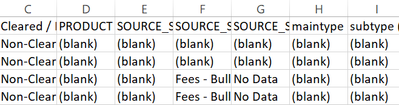
Barclaysusercds_0-1653479622386.png


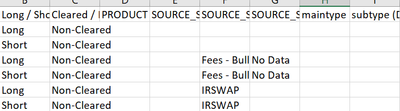
I want to change it to look like 

Barclaysusercds_2-1653479700787.png


Thanks


1 REPLY 1
PhilipMannering
16 - Nebula
16 - Nebula

Try using the multifield tool,

PhilipMannering_0-1653481705485.png


Labels
Top Solution Authors