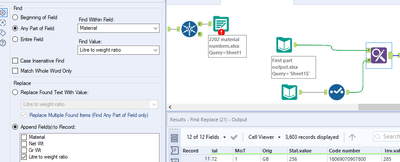
I have done the below formula but the value I want to appear is not appearing, instead the cells it should be in are blank, what are the possible reasons?
Hi @BillyL14,
Just connect your files and try if it works for you 🙂
By any chance, you can share with us some example of the data?
Actually I found something that might help you. There is a possibility you have a null or blank data in the file that you are using for the replacing.
https://community.alteryx.com/t5/Alteryx-Designer-Discussions/Why-will-the-Find-and-Replace-not-work/td-p/350189
It will be worth to take a look at the file that you are using for the replace input if this file doesn't have null/blanks.
Hi @BillyL14 — Is it a part of your recent post?
https://community.alteryx.com/t5/Alteryx-Designer-Discussions/Find-and-replace/td-p/623322?lightbox-message-images-623322=129674iDE574B8D2F1CB474
1st, You need to change the data type to String for the respective incoming anchor(s), you can use Formula or Select tool.
Once you get the output from "Find Replace" then rollback the data type using Formula tool (if you want).
Hello @BillyL14 ,
The first thing I can see is the case insensitive check box. check it. it will ignore characters case.
Hope it makes sense.
Hi @vizAlter
Thanks, I'm not sure what you mean by rollback?
I think he @vizAlter wanted you change the data type to string as it is required for the find and replace tool.
After you will use the find the replace tool you can rollback to the previous data type using select or formula tool.
@BillyL14 Find and replace started working for you?