I have created a workflow to export data to an Excel (sheet name: RAWDATA). Using this file, I created a new sheet name PIVOT and created a pivot table based on the data in RAWDATA sheet. I named this Excel file "output.xslx", which will be my output template for this workflow.
Using the same workflow, I am trying to update it to:
- Export the data to the output template "output.xslx|||RAWDATA"
- Rename the output template to "output_YYYYMM.xlsx" where YYYYMM is the reporting month
To achieve point 2 - rename filename, I used the option "Take File/Table Name From Field" as shown below. I can't use the append suffix or change filename option in the dropdown because of the Excel Sheet name in the file path.
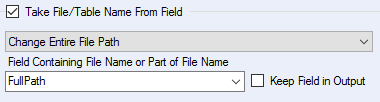
However, this method result in an output file with the correct name, but the PIVOT tab is no longer in the output. This means it is not really using the prebuilt template but creating a new file with the filename "output_YYYYMM.xslx".
Anyone have any other suggestion on how can I export data using a prebuilt template and rename it to the desired output filename?


