In case you missed the announcement: The Alteryx One Fall Release is here! Learn more about the new features and capabilities here
ACT NOW: The Alteryx team will be retiring support for Community account recovery and Community email-change requests after December 31, 2025. Set up your security questions now so you can recover your account anytime, just log out and back in to get started. Learn more here
Start Free Trial

Alteryx Designer Desktop Discussions

Find answers, ask questions, and share expertise about Alteryx Designer Desktop and Intelligence Suite.

Error in Alteryx Gallery

becca51178
5 - Atom

I have a workflow that I run on my desktop app with no issues. When I try to run it from the gallery I get this error

 

Controller Error.PNG


Now when I run it from the desktop app the error doesn't happen. It's only when I run it from the gallery. I have tried every way to fix the formula and nothing is working. This is what I have now that is still throwing an error. All I want to do is have the formula look at a number column which is currently formatted as Double and if it is more than 10M then it says "Greater than 10M"


I have tried several variations that doesn't have "To String" in front of it. The output is a VW_String format. I am not sure what else to do. 
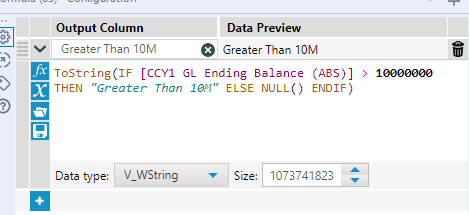
 

Error Example 1.PNG

3 REPLIES 3
TheOC
16 - Nebula
16 - Nebula

hi @becca51178 

assuming that your [CCy1...] field is a numeric, you dont need a tostring output. your "greater than 10m" is a string, and null() is a valid output for a string. 


TheOC_0-1603839691196.png


Heres a quick example with a formula that works

Cheers,
TheOC
Connect with me:
LinkedIn Bulien
becca51178
5 - Atom

I made the change but it's still throwing the error. 


This just started. I had no issues with these workflows running on the gallery and now all of a sudden they keep getting throwing errors on this formula. Its just bizarre. 


Error2.PNG

BrandonB
Alteryx
Alteryx

@becca51178 your CCY1 GL Ending Balance value may currently be a string and therefore trying to compare it to a number will throw an error. Can you change it to ToNumber([CCY1 GL Ending Balance (ABS)]) in your formula

Labels
Top Solution Authors