I am trying to download the html from a page, find the links to zips in it, and download those zips. This is a job that currently a person has to do every couple of weeks by just browsing and saving them to our network.
I already successfully do this for a half dozen other websites, but now I am stuck with a page where instead of downloading the html that is rendered via a browser I am ending up with the code for a challenge page. It contains things like 'challenge-error-text' and 'Enable JavaScript and cookies to continue' and does not contain the info I need to get.
The only header I am using in the download tool is User-Agent
| User-Agent | Mozilla/5.0 (Windows NT 10.0; WOW64) AppleWebKit/537.36 (KHTML, like Gecko) Chrome/50.0.2661.102 Safari/537.36 |
Is there anything more/different I could/should be using here to get around the challenge page and make this site believe I am using a browser? This is the returned download headers.
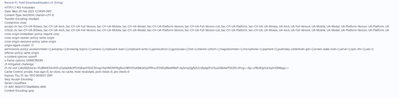
I am new to this but that reads as if Cloudflare can tell I am scraping and doesn't want to allow it
(EDIT: I should add that the data is public and the body in question know i want to be able to scrape their website - they have made an allowance for my IP in the firewalls.)
Thanks,
Ian


