Hey!
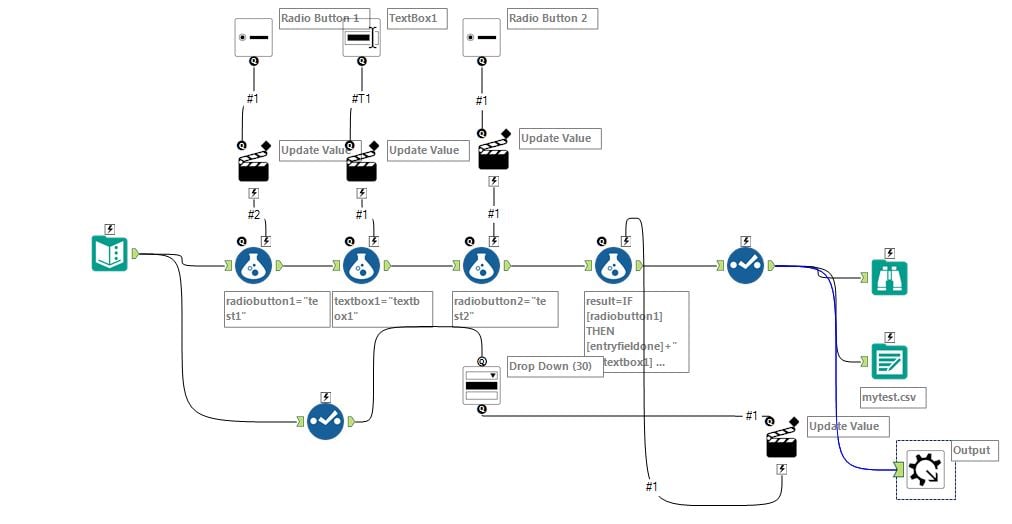
I have develop a macro with Radio Button and Drop Down Box Tool.
In my example I have two Radio Button Tools.
The first Radio Button Tool should be work together with a Text Box Tool.
The second Radio Button Tool should be work together with a Drop Down Tool, the Drop Down Tool should be include in the drop down menu the columns from a Input Data or Test Input Tool.
Two thinks I want to implement:
1.)
- When I select the first Radio Button Tool, I want to disable the Drop Down Tool an enable the Text Box Tool.
- When I select the second Radio Button Tool, I want to disable Test Box Tool and enable Drop Down Tool
If it possible because I have never found a setting.
2.) The other think I want to implement:
The Drop Down Tool should be include in the drop down menu the columns from a Input Data or Text Input Tool.
The rows of the Input Tools are filled with any values.
In my example two columns and one row
Then I connect the Input Tool with the Drop Down Box Tool.
Then I connect the Drop Down Tool with a Formular to select as result the value (row entry) of the choosing column of the Drop Down Tool.
I run the marco in a new workflow.
But I always get in the result the name of the column.
How is the right setting to reach the solution?
I attached my build macro and a image, where do you can see what I try to explain.
Mathias


