In case you missed the announcement: The Alteryx One Fall Release is here! Learn more about the new features and capabilities here
ACT NOW: The Alteryx team will be retiring support for Community account recovery and Community email-change requests after December 31, 2025. Set up your security questions now so you can recover your account anytime, just log out and back in to get started. Learn more here
Start Free Trial

Alteryx Designer Desktop Discussions

Find answers, ask questions, and share expertise about Alteryx Designer Desktop and Intelligence Suite.
SOLVED

Designer | how to check/compare 2 column values and return 3rd column data

PB41091
8 - Asteroid

I have 2 data set.

Data Set 1

ABC
10.015
10.055
10.15
10.210
10.540
20.0130
20.0530
20.220


Data Set 2

ABD
10.017
10.054
10.18
10.22
10.54
20.019
20.0556
20.28


and I want output as

ABCD
10.0157
10.0554
10.158
10.2102
10.5404
20.01309
20.053056
20.2208


I tried union, but it is simply appending the data, by using join I have to give only unique 1 column, where as I have to check condition --> if cloumn A has 1 and column B has 0.2 then return 2 in new column of data set 1.

4 REPLIES 4
JarekSkudrzyk
11 - Bolide

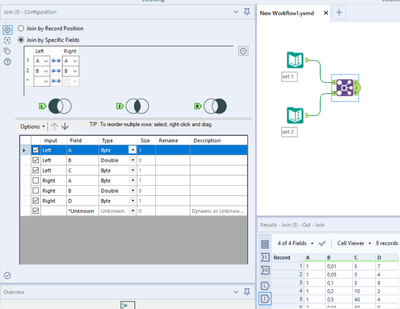
@PB41091 use join tool on columns A and B:

JarekSkudrzyk_0-1649272839934.png


SPetrie
13 - Pulsar

You can join on multiple fields.

Once you select your first comparison, the dropdown to select a second will appear

SPetrie_0-1649272800349.png


PB41091
8 - Asteroid

Thank you. It works. Never thought its that simple.

JarekSkudrzyk
11 - Bolide

Glad I could help:)

Labels
Top Solution Authors