In case you missed the announcement: The Alteryx One Fall Release is here! Learn more about the new features and capabilities here
ACT NOW: The Alteryx team will be retiring support for Community account recovery and Community email-change requests after December 31, 2025. Set up your security questions now so you can recover your account anytime, just log out and back in to get started. Learn more here
Start Free Trial

Alteryx Designer Desktop Discussions

Find answers, ask questions, and share expertise about Alteryx Designer Desktop and Intelligence Suite.
SOLVED

Designer | Efficient way to provide a sorted Date as an Input

walkingbird
6 - Meteoroid

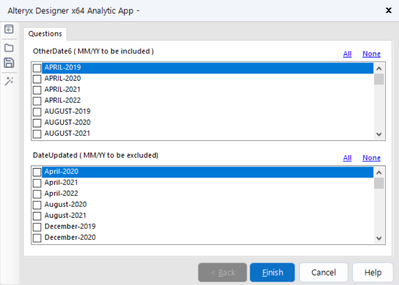
I am trying to create an app where the interface tool would allow the user to input the Month-Year via Multi-Select List Box.

The Date is in yyyy-mm-dd in the source data format which i am converting to Month-Year via Datetimeformat formula.

and using it as a input parameter in the Filter tool in Step 4 ans Step 6 [Annotated in the workflow]

However, i am unable to find a way to show the dates in a sorted manner , i.e Ascending.

Currently they display as below -
walkingbird_0-1664418180234.png

However i would like to display them sorted as Ascending like below 


September-2019

October-2019

November-2019

December-2019

January-2021

February-2021

March-2021


If anyone has any other suggestions in regards to date format , that would work as well.

Thank You


1 REPLY 1
gautiergodard
13 - Pulsar

Hello,

See attached for a possible solution to this problem. I've modified container 49 with the functionality which you could replicate in the other interface option within your workflow (container 39). 


Hope this helps!


**Please like this post and mark this thread as resolved if this provided the answer to your question**

Labels
Top Solution Authors