Dear All,
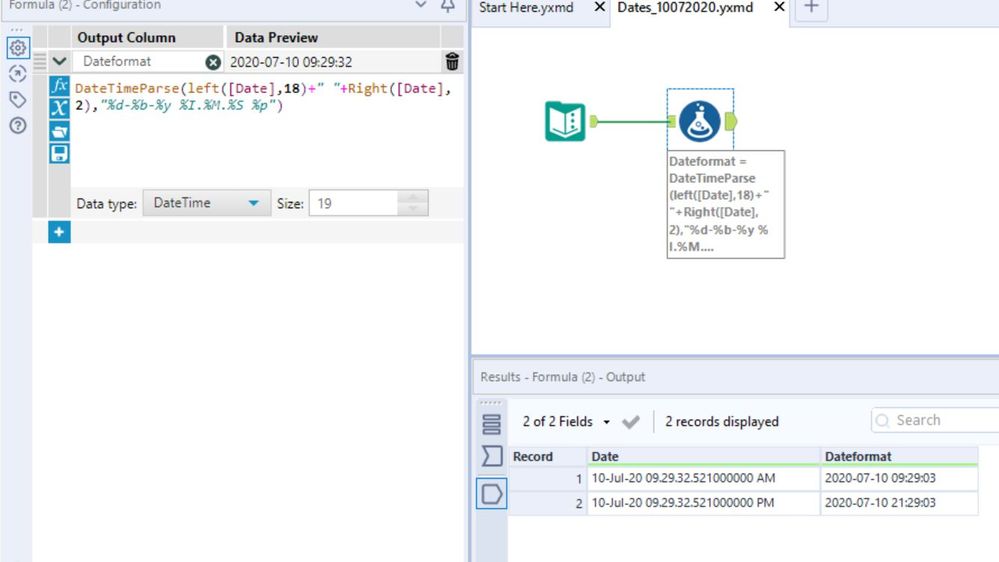
Can you please advise how to parse a string field like this 10-Jul-20 09.29.32.521000000 AM. I need a standard date time format to allow performing a Date time difference between two dates.
Many thanks for your help in advance.
Regards
Hi @JAIN2 I mocked up a workflow let me know what you think?
@JosephSerpis great answer, although this doesn't round the seconds based on the milliseconds. @JAIN2 if you care about that, then you can amend Joseph's formula to:
datetimeparse(left([Date],16)+tostring(tonumber(substring([Date],16,5)),0)+" "+RIGHT([Date],2),"%d-%b-%y %I.%M.%S %p")
Hi @JAIN2 , try using datetimeparse function it will convert your date format into standard format that alteryx use.
Formula:
DateTimeParse(Substring([Field1],0,18)+" "+Right([Field1], 2),"%d-%b-%y %I.%M.%S %p")
I hope it helps.
Thanks.
Thank you joseph..