The Alteryx Community is a finalist in three 2026 CMX Awards! Help us win Customer Support Community, Most Engaged Community, and User Group Program of the Year - vote now! (it only takes about 2 minutes) before January 9.
ACT NOW: The Alteryx team will be retiring support for Community account recovery and Community email-change requests Early 2026. Make sure to check your account preferences in my.alteryx.com to make sure you have filled out your security questions. Learn more here
Start Free Trial

Alteryx Designer Desktop Discussions

Find answers, ask questions, and share expertise about Alteryx Designer Desktop and Intelligence Suite.
解決済み

Date Field converts to V_WString in Alteryx

Suruchi23
アトム

Hello All,


I have a macro that reads data from SQL server and then I use the data from this macro in another workflow. After certain data manipulations, I publish it to Tableau Server.


The issue I am getting is that there is a 'date' field in one of the sql tables that is a part of Macro Output. When the other workflow reads the data from Macro Output, it assigns 'V_WString' type to this field and therefore, the tableau dashboards throw error. It used to work fine on my team member's machine strangely.


Any advise on how this can be resolved? I tried using 'DateTime' function but when I use it, this function does not recognize the field as string type so does not appear and hence, I cannot convert it to 'Date' type in the workflow.


Thanks,

Suruchi

6件の返信6
JoshuaGostick
クエーサー

Hi @Suruchi23 ,


Do you have access to edit the macro? If so, you can maybe try adding a Select tool just before the Macro Output tool to force the field to be a date field.


Josh

Suruchi23
アトム

Hi


JoshuaGostick
クエーサー

Right, I see.


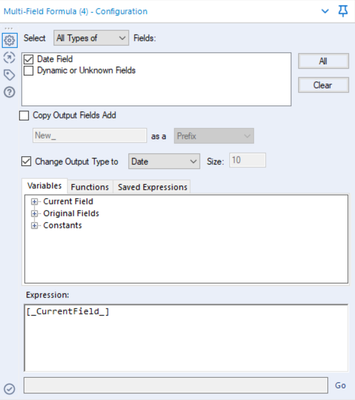
What about using a Multi-Field Formula tool after the Macro Output?


Try configuring the tool like the screenshot below. Select the specific date field. Deselect Copy Output Fields Add. Then, select Change Output Type to and change the type to a Date. This will ensure that the field is Date type regardless of whether it comes through as a date or a string.


Finally, under Expression, have [_CurrentField_].


clipboard_image_0.png


Let me know if this works!

Suruchi23
アトム

Hi  


I have made the change as suggested and the workflow is currently running. I will confirm once its done.


Many Thanks,

Suruchi

Suruchi23
アトム

Hi


Thanks a lot for this advise, it has worked!


Regards,

Suruchi

JoshuaGostick
クエーサー

Hi @Suruchi23,


Fantastic! Glad to hear.


The Multi-Field Formula tool has that little trick where you can change the data type of an existing field unlike the Formula tool. Can come in handy!


Josh

ラベル
トップのソリューション投稿者