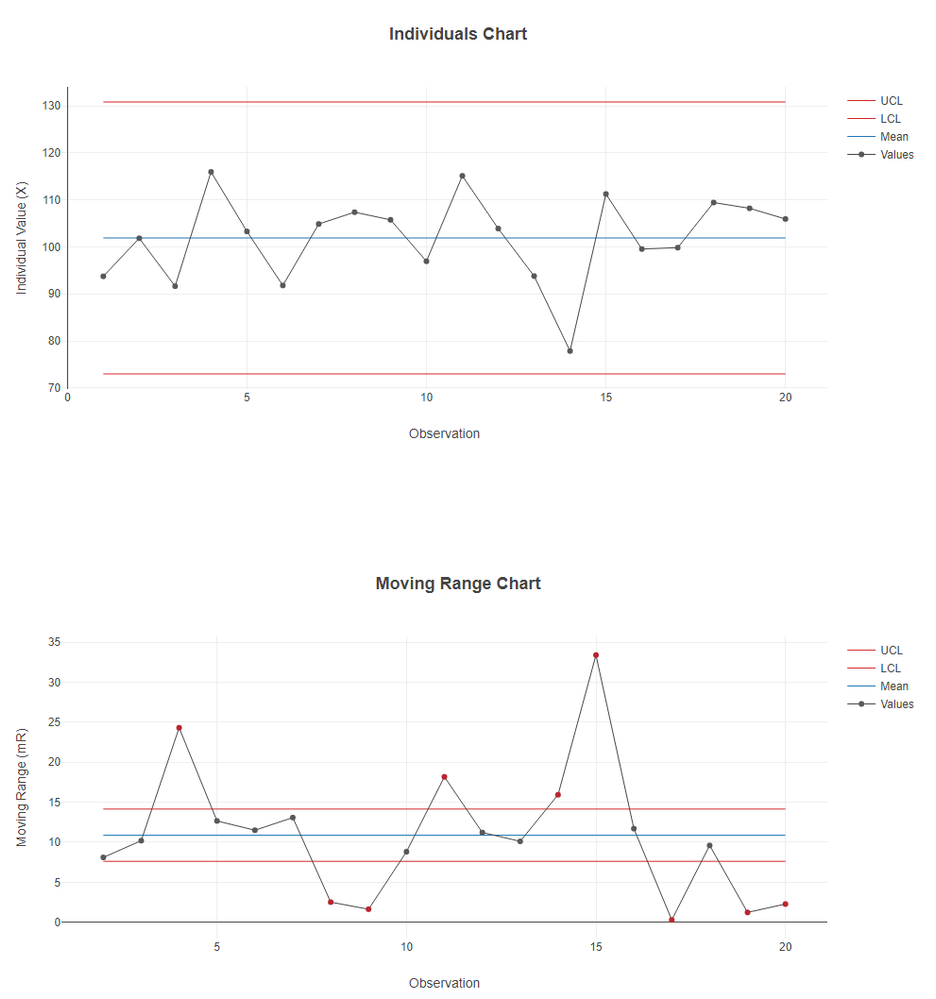
This is an old thread, but I needed to create some XmR control charts recently, and thought I'd leave this here in case someone needs it in the future. The attached workflow creates X (individual) and mR (moving range) control charts.
Note, this is only flagging points outside of the control limits (it's not checking any other WECO or Nelson rules).
An alternative option would be to use the R tool with one of the SPC packages (such as qcc or rspc) to apply the rules, and either chart in R or output the flagged data from the R tool to be charted in Alteryx.
Hi @charlie_taylor
It looks like this post was missed originally. I've asked the Solutions Engineering team if anyone has used Alteryx in this way before.
Thanks
I am interested in Alteryx and Control Charts.... a reply would be good.
Also Interested in this topic as it is a must-have capability for any worthwhile organization's optimization processes.
Another vote for this
But also, for run chart rules, see attached doc
Basically something that could check for
I need to do SPC on large datasets is this possible using an Alteryx workflow
Thank you. This is very helpful.
coo, cant believe how short that workflow is and does all that!
attached is my attempt at a run chart rules and is MASSIVE in comparison
this applies a test to a run chart, testing for shifts, trends and the correct amount of runs given the amount of data points. I've tried to code the tests from the article here. cant code one of them, the "astonomical data point" as Alteryx seems to lack an Eyeball tool.
.
The workflow outputs a text summary of the checks performed. The last 5 yards arent complete in terms of what youd want output, but the tests seem to be accurate.
I want to add a thing to "fix" the median if it is ran and passes all 3 tests, so the median isnt re-calculated every time a new datapoint is added, causing potential "drift"
Any errors spotted will be gratefully received.