Hi all,
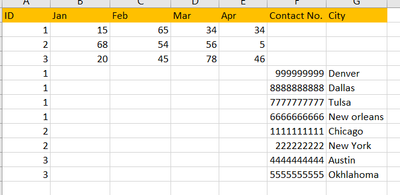
I am trying to arrange my the output vertically into 2 sections from
to
The first screenshot is the output of Layout tool. Is there any way to arrange the data in 2 vertical sets?
Thanks
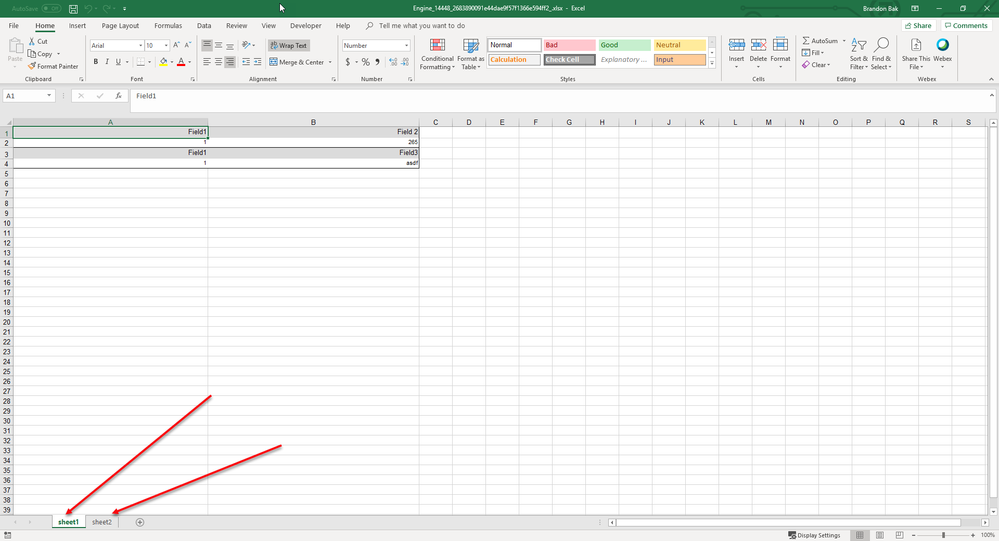
I think I understand what you are trying to accomplish. It is probably easiest to make a separate table for each upper and lower table, bring them together in a layout tool, and then configure the render tool as follows. You will not need an output data tool at all, just a Render tool. In this example, tables are created for two sets of upper and lower pivots. You can create these by filtering for year from your main data set. Then the top group is fed into a join multiple and then a layout tool in order to configure how it will look on the spreadsheet. Then the second group has the same process done. The layout tool produces layout objects that can then be rendered. You can stack these together using a union tool as seen below and then feed into the render tool. The render tool should then be configured to "Insert Section Breaks Between Records". This will then render each layout object into its own sheet in the Excel document as seen in the second picture.
You will want to use two separate table tools. One that creates the table up top and the second table for the data down below. This is needed because the columns down below are different than the columns up top. Then bring these tables together with a join multiple, feed into a layout tool with align vertical setting, and then render out.
Hi @rajputakansha ,
Change 2nd table alignment to Left .
Thanks for the reply!
I changed it to left. Its still the same.
Hi @BrandonB
Thanks for your reply.
Can you please create a dummy work flow? It would be easier for me to understand.
Thank you for your help!