ACT NOW: The Alteryx team will be retiring support for Community account recovery and Community email-change requests Early 2026. Make sure to check your account preferences in my.alteryx.com to make sure you have filled out your security questions. Learn more here
Start Free Trial

Alteryx Designer Desktop Discussions

Find answers, ask questions, and share expertise about Alteryx Designer Desktop and Intelligence Suite.
SOLVED

Custom icons - Alteryx removes coloring

Lwe
6 - Meteoroid

Hi,

Im trying to use my own icon for a macro.

When I'm using a clear crisp colored icon the color is removed by Alteryx.

If I save with Paint for example I get an unclear image but at least Alteryx doesn't remove the "background" color.

Is there a way that I can actually get that clear colored icon

Here you can see the result
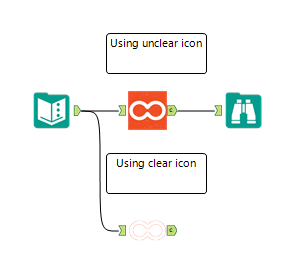
 LogoColor.PNG

The logos are attached 

Thanks

Lars

2 REPLIES 2
jdunkerley79
ACE Emeritus
ACE Emeritus

Try saving them as png files with a transparent background.

I think Alteryx like 171x171 resolution as well. 


I've been using Paint.Net to generate icons for macros and custom tools for a while and works pretty well as png files.

MarcSchonwandt
7 - Meteor

It seemed to be an issue with transparency. 


1) Opened with paint, resized and saved as png = did not work.

2) Opened with paint, resized, changed the color of one pixel and then changed it back = worked.


Best,

Marc

Labels
Top Solution Authors