ACT NOW: The Alteryx team will be retiring support for Community account recovery and Community email-change requests Early 2026. Make sure to check your account preferences in my.alteryx.com to make sure you have filled out your security questions. Learn more here
Start Free Trial

Alteryx Designer Desktop Discussions

Find answers, ask questions, and share expertise about Alteryx Designer Desktop and Intelligence Suite.
解決済み

Cross Tab is Replacing space between column names with underscores

saiirangam
アステロイド

I am having around 150 rows that needs to be converted into Column Names, whenever I use Crosstab tool it auto replaces space between the column Names with Underscores is there any way to avoid this, My Column Names are dynamic and keep changing every time.


Is there any alternative way to do this rather than using Select tool to renames these column names just to remove Underscore in the headers


4件の返信4
gautiergodard
パルサー

@saiirangam 

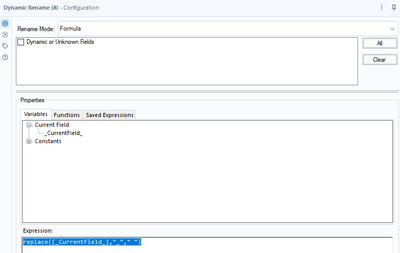
Yes ! You can use the dynamic rename tool in the developer tool pallet.

Select all of the columns (including dynamic or Unknown Fields) and select Rename mode: Formula

Then use the formula below:

replace([_CurrentField_],"_"," ")


gautiergodard_0-1667485182522.png


saiirangam
アステロイド

@gautiergodard  Thank you heads up , does this apply for Headers are data?

gautiergodard
パルサー

@saiirangam Correct, this will apply to the column headers in your data set.


Please dont forget to accept this post as a solution if it answered your question!

saiirangam
アステロイド

Thank you it worked 

ラベル
トップのソリューション投稿者