Anyone working with Excel data inevitable encounters the situation where data needs to be "filled down" to blank rows below values.
Suppose, for example, that you wanted to convert this data:
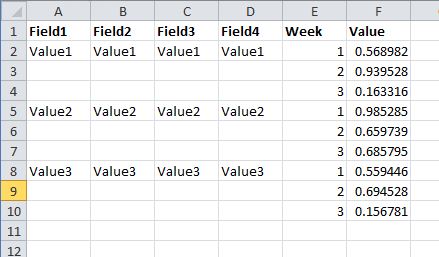
Into this:
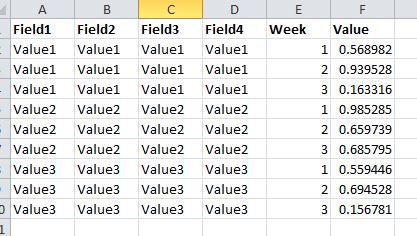
The typical approach would be to use the Multi-Row tool with a basic formula such as IIF(ISNULL([Field1]),[Row-1:Field1],[Field1]) which essentially returns the value of the row above whenever the current row is null. This works great, however if I wanted to do this for Fields 1 through 4, I'd have to repeat the multi-row tool four times, rebuilding the formula each time. You can imagine how combersome this would get with 20 columns of data.
My goal, then, is to build a macro that would allow me to select which fields I'd like to "fill down", and it would take care of the rest.
My plan was to use an outer macro which would get a list of the incoming fields and provide the user with a list box to check off which fields they wanted to fill down. It would then call a batch macro, passing in each field name, and the batch macro would update the expression in a multi-row tool and process the data for each field the user selected. The final output of the whole macro would look identical to the incoming stream of data, except that all the null values in the selected columsn would be filled in.
I'm running into odd errors that are dificult to debug since it's hard to "step through" things in Alteryx.
Has anyone done something like this? The basic concept could be useful for many things, because it's essentially enabling a specific tool to be run against several fields that a user selects.


