ACT NOW: The Alteryx team will be retiring support for Community account recovery and Community email-change requests Early 2026. Make sure to check your account preferences in my.alteryx.com to make sure you have filled out your security questions. Learn more here
Start Free Trial

Alteryx Designer Desktop Discussions

Find answers, ask questions, and share expertise about Alteryx Designer Desktop and Intelligence Suite.
SOLVED

Creating a Dynamic number of Duplicate Columns

GreenApple24
6 - Meteoroid

Hey guys,


Currently having a brain freeze. I think that there is a way to solve this issue with crosstab/transpose, but I haven't quite figured it out yet.


I have this file where it has a dynamic number of "sets" of data. I want to move the duplicates to new columns, rather than having them all stacked as one row. See the screenshot below: 


Input : As you can see, the rowID's change after every "section" (group of 4). There is a dynamic amount of RowID's, but the type and amounts are all the same. I'm struggling to get a workflow that would create a dynamic amount of new duplicate columns rather than stacked rows.

I have the input file attached below.
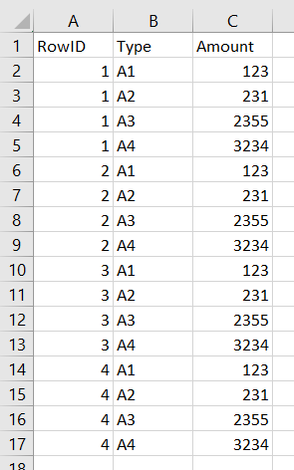
GreenApple24_2-1686691906686.png

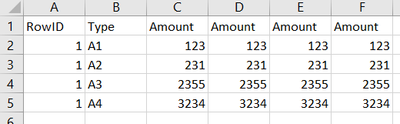
Output: This is the desired output.

GreenApple24_3-1686691919756.png


Thanks in advance for the help!

GreenApple24

3 REPLIES 3
DanielG
12 - Quasar

@GreenApple24  - try this.  I ignored the RowID in the desired output only because it doesnt make sense that 1 would be aligned with what was formerly 2,3,4 row IDs.


GreenApple24
6 - Meteoroid

This is exactly what I was looking for. Thank you so much for the fast and simple response!

DanielG
12 - Quasar

@GreenApple24  - my pleasure.  that is what this community is for.  

Labels
Top Solution Authors