The Alteryx Community is a finalist in three 2026 CMX Awards! Help us win Customer Support Community, Most Engaged Community, and User Group Program of the Year - vote now! (it only takes about 2 minutes) before January 9.
ACT NOW: The Alteryx team will be retiring support for Community account recovery and Community email-change requests Early 2026. Make sure to check your account preferences in my.alteryx.com to make sure you have filled out your security questions. Learn more here
Start Free Trial

Alteryx Designer Desktop Discussions

Find answers, ask questions, and share expertise about Alteryx Designer Desktop and Intelligence Suite.
SOLVED

Create accumulated sales column

brunod
7 - Meteor

Hi Community!


I need to calculate a cumulative sales considering 3 variables (in this example): period (year-month), country and product.


Example.... picture 1 shows sales history during 2019 01 to 2019 03, to 2 countries and 3 products.


picture 1
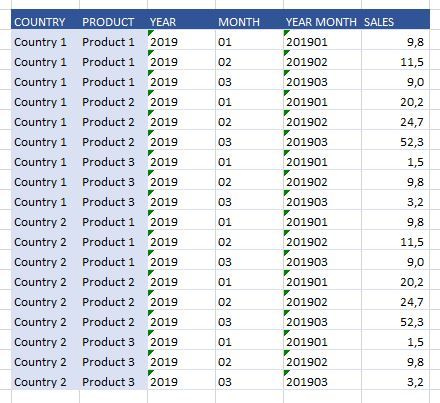
foto1.JPG


and here's how cumulative sales should be calculated


picture 2
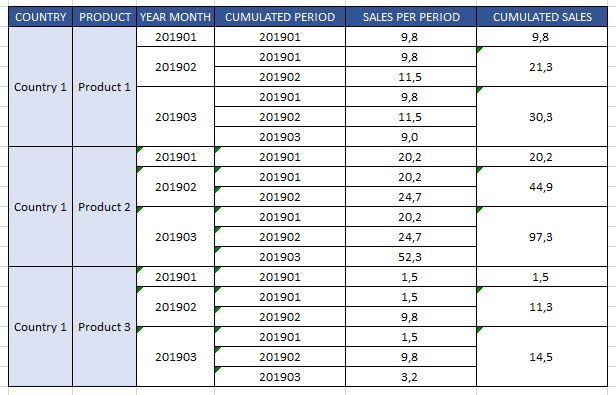
foto2.JPG


Please, could someone help me with this?


Thanks!

4 REPLIES 4
CharlieS
17 - Castor
17 - Castor

Use the Running Total tool.

https://help.alteryx.com/current/RunningTotal.htm


The tool settings in this case should be Group By: Country, Product, then Create a Running Total for the Sales field.

JosephSerpis
17 - Castor
17 - Castor

Hi @brunod you can do this using the running tool or the multi-row formula tool.

brunod
7 - Meteor

xactly what I needed! Thanks CharlieS!

brunod
7 - Meteor

Labels
Top Solution Authors