In case you missed the announcement: The Alteryx One Fall Release is here! Learn more about the new features and capabilities here
ACT NOW: The Alteryx team will be retiring support for Community account recovery and Community email-change requests after December 31, 2025. Set up your security questions now so you can recover your account anytime, just log out and back in to get started. Learn more here
Start Free Trial

Alteryx Designer Desktop Discussions

Find answers, ask questions, and share expertise about Alteryx Designer Desktop and Intelligence Suite.
SOLVED

Compare Two Dates from Different Inputs

HRivera
7 - Meteor

Hi All, 


Asking for your help regarding this one. I'm trying to compare two dates from different sources one serves as the input one serves as a reference. If the particular date is found on the reference, the data will be deleted on the input. Input - "New Date" Reference - "Holidays"

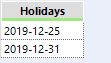
HRivera_0-1579077823781.png 

HRivera_1-1579077876446.png


Appreciate your help.


Thanks.

5 REPLIES 5
afv2688
16 - Nebula
16 - Nebula

Hello @HRivera ,


Are you looking for something like this?


If this post helps, then please consider Accept it as the solution to help the other members find it more quickly.

Regards

RolandSchubert
16 - Nebula
16 - Nebula

Hi @HRivera ,


use a Join tool and join on New Date = Holidays. The left output anchor will return the "not-holiday days".

15-01-_2020_10-01-47.png

Hope this is helpful.


Best,


Roland

HRivera
7 - Meteor

Hi @


afv2688
16 - Nebula
16 - Nebula

Then you can use this 🙂

HRivera
7 - Meteor

Hi @RolandSchubert, 


Wow! This is amazing. Will try and get back to you. Will let you know if it worked. 


Thanks! 

Labels
Top Solution Authors