ACT NOW: The Alteryx team will be retiring support for Community account recovery and Community email-change requests Early 2026. Make sure to check your account preferences in my.alteryx.com to make sure you have filled out your security questions. Learn more here
Start Free Trial

Alteryx Designer Desktop Discussions

Find answers, ask questions, and share expertise about Alteryx Designer Desktop and Intelligence Suite.
RESUELTAS

Combine 2 columns and group values into one column

ashishshetty
Meteoroide

Hello!


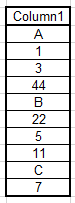
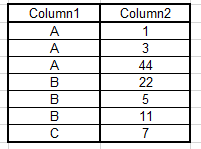
Beginner user, not sure if this question has already been answered. I am looking to combine 2 columns to get a single column, but with single grouped value of column 1 repeated only once.


For example:


Input:
ashishshetty_0-1602878352984.png

Output:

ashishshetty_1-1602878376219.png

Attached is a sample excel input.


Appreciate the help! Thank you!

3 RESPUESTAS 3
jdunkerley79
ACE Emeritus
ACE Emeritus

I'd suggest:

jdunkerley79_0-1602879153622.png

Start by using a summarise tool to concatenate all the values in Column2 to a single string for each Column1 separated by columns

Then you can use a formula tool to add Column1 value in front of the concatenated values

Finally a text to columns tool will break it up into the rows you need.


Sample attached


ashishshetty
Meteoroide

Thank you very much!

BaDaBoom
Meteoro

I used your solution to solve the opposite problem.

Thank you very much !!!!

Etiquetas
Autores con mayor cantidad de soluciones