In case you missed the announcement: The Alteryx One Fall Release is here! Learn more about the new features and capabilities here
ACT NOW: The Alteryx team will be retiring support for Community account recovery and Community email-change requests after December 31, 2025. Set up your security questions now so you can recover your account anytime, just log out and back in to get started. Learn more here
Start Free Trial

Alteryx Designer Desktop Discussions

Find answers, ask questions, and share expertise about Alteryx Designer Desktop and Intelligence Suite.
SOLVED

Check if sheet of excel file exists

KMadamba
8 - Asteroid

I am currently doing an error report and would want to catch all the files that is missing a specific sheet. This specific sheet will be my data source for another workflow, that is why I would want to filter them out so that this other workflow will not process them and will go to the error report instead.


I was wondering if there's a way to check if an excel file sheet exists.


I tried using FileExists() and then added the sheet name into the formula tool and then pass it onto a filter tool like this but this does not do the trick.
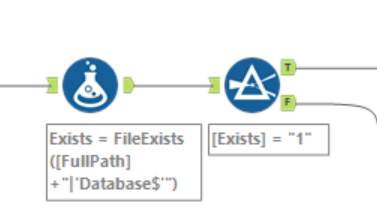
 

snip.PNG

5 REPLIES 5
afv2688
16 - Nebula
16 - Nebula

Hi @KMadamba 


Are you checkin if a file you are reading has the specified sheet names? You can click while doing the loading of the file to read only the sheet names, that way you can check if every single one of them is there, doing a count or a name check value.


cheers

KMadamba
8 - Asteroid

Thank you! This is exactly what I was looking for. 

williamdilley
6 - Meteoroid

I did this but now want to incorporate that into a conditional if statement as such, but its now working:


IF "Sheet Names" = "Data"
THEN "Tab Name is Correct" ELSE "Tab Name is Incorrect"
ENDIF


williamdilley_0-1610572678322.png


williamdilley
6 - Meteoroid

Typo, its not working.

KMadamba
8 - Asteroid

Hi @williamdilley 


To only check if the sheet exists within a file, I used a filter tool for mine and applied formula to output the message, then union both outputs back together, like so;


KMadamba_0-1610590797710.png

KMadamba_1-1610591010908.png


Labels
Top Solution Authors