ACT NOW: The Alteryx team will be retiring support for Community account recovery and Community email-change requests Early 2026. Make sure to check your account preferences in my.alteryx.com to make sure you have filled out your security questions. Learn more here
Start Free Trial

Alteryx Designer Desktop Discussions

Find answers, ask questions, and share expertise about Alteryx Designer Desktop and Intelligence Suite.

Changing the "group by" variable in a macro

srea541
8 - Asteroid

Hi folks,

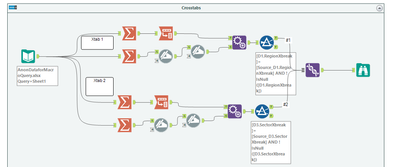
In the attached workflow, I am currently having to repeat part of the workflow to achieve my output.


For the Xtab1 and Xtab2 sections, is there a way to use a Macro to dynamically change the "group by" variable in the summarize tools, and dynamically updating the filter at the end of each section also?
 

srea541_0-1684938744815.png


Thanks!


1 REPLY 1
RSreeSurya
9 - Comet

Hi,


yes, it is possible. This can be achieved by dynamically updating the XML of the Summarize, Transpose & Filter tools utilized in your workflow. 


RNSupraja_0-1684940370792.png


Labels
Top Solution Authors