I am trying to recreate an API request using the download tool, but I am failing to get the expected result back. The API I am trying to connect to is: https://use-land-property-data.service.gov.uk/api-documentation
Within the documentation it states that you need the API key in an Authorization header and also an Accept header with the value application/json. I've been able to successfully recreate this in Postman and the python script generated is as follows:
import requests

url = "https://use-land-property-data.service.gov.uk/api/v1/datasets/history/ccod/CCOD_FULL_2022_06.zip"

payload={}
headers = {
  'Accept': 'application/json',
  'Authorization': '[MY API KEY ENTERED HERE]'
}

response = requests.request("GET", url, headers=headers, data=payload)

print(response.text)However when trying to replicate this in the download tool I am encountering an error. This is my set up:
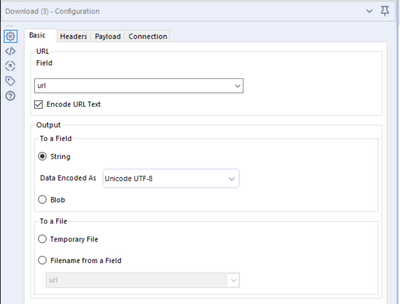
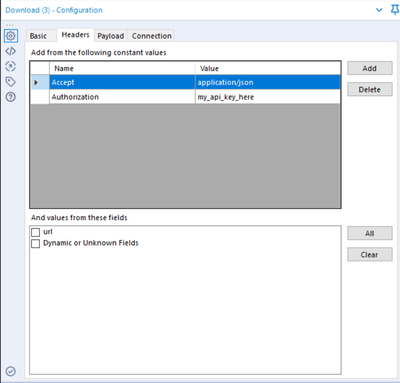
N.B. I have my actual API key entered in my workflow.
The response back is a html page with a bad request message. Is there anything else that needs to be configured?
Thanks


