In case you missed the announcement: The Alteryx One Fall Release is here! Learn more about the new features and capabilities here
ACT NOW: The Alteryx team will be retiring support for Community account recovery and Community email-change requests Early 2026. Make sure to check your account preferences in my.alteryx.com to make sure you have filled out your security questions. Learn more here
Start Free Trial

Alteryx Designer Desktop Discussions

Find answers, ask questions, and share expertise about Alteryx Designer Desktop and Intelligence Suite.
SOLVED

Calculation instructions controlled by excel input file

Javier070590
7 - Meteor

Dear Community,

I would like to ask you if it is possible to control some calculation by excel input file. I have some already prepared data and I have some financial measures there. However some of that data need to be recalculated further. In the first table below there is a sample of calculated results and based on that there is a second table with instructions - the second table would be a external "dictionary". For example, to calculated measure Z, I need to add measure A to measure B and then deduct measure C. The new measure after calculation needs to be unioned with the first table.
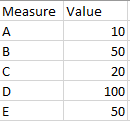
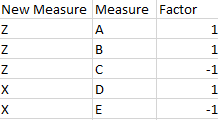
 

Javier070590_0-1653215015618.png


Javier070590_1-1653215030162.png


Thank you in advance,

Marcin


1 REPLY 1
Ladarthure
14 - Magnetar
14 - Magnetar

Hi @Javier070590,


if you want to do this, you can process in multiple steps 

  1. Connect both files, the one with your data, the on with your coefficients
  2. join those files using a join tool on the field measure
  3. from the J (joined) output of the tool, you can then create a formula to multiply value by the factor
  4. finally, you can use a summarize tool to agregate by using a group by on new measure and summing the previous field calculated in the step 3


Arthur

Labels
Top Solution Authors