Hi All,
I've got a problem trying to import a csv file through Input Data. I'm importing a file one created by one of our systems, and it seems that alteryx doesn't like an exclamation point after a quote in the file.
Here is a sample csv file to show what I mean:
field1,field2,field3,field4,field5
alteryx,is,the,best,ever
alteryx,is,the best,ever,
alteryx,is,the best,ever,
alteryx,is,the best,"ever"!!,
alteryx,is,the best,"ever!!",
It doesn't like row 5, the "ever"!!, part. It doesn't have an issue with the line after, as the exclamation marks are in the quotes.
I can't use option 9 Ignore Delimiters in Quotes as my data often (but not always) has data I need in quotes there, ie ,12345,"Last, First, M",etc so I need those to be escaped with quotes.
The system that makes this file has a 'comment' field which is where the "ever"!! portion is written. I don't even need that field but I can't control the output. I also cannot change it in the system itself.
The comment field in question is linked to a regular customer, so this comment field shows up in the daily reports regularly. As far as I know it is just one customer that causes this though.
I also can't use option 10 "Treat Read Errors as Warnings" as it causes the entire record to be [Null] values, instead of just the comment field there.
I thought about inputting the data with a dummy delimiter, using replace to change '"!!' to '!!"' but I don't know how to get the workflow to wait for the Output Data to finish before running the second Input data. Block Until Done didn't work as Input Data didn't have an input. An example: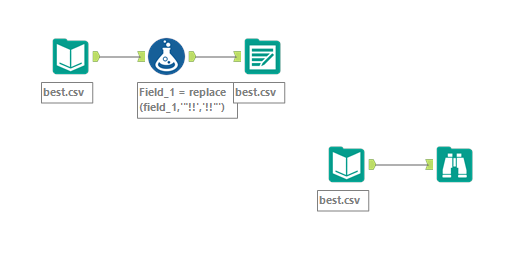
Are there any options to solving this that I did not consider? Thanks!


