I have the below arrangement in a macro.
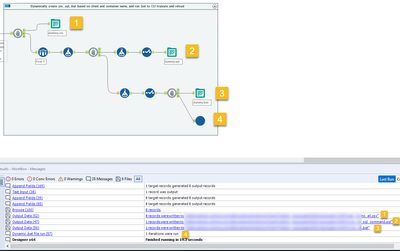
We have a requirement to write the data to a SQL table after the workflow is run, but we do not use the Alteryx Output Data connectors. Instead, we use a command line interface to write to the table. The workflow accomplishes this by doing the following, where the markers in the picture correspond to the list below. Chained Block Until Done tools are used to ensure that the outputs happen in the below specific order.
- It outputs the datastream to a .csv file with a dynamic filename based on one of the fields of data.
- Sampling just one record of data, it uses the fields to construct a .sql query which loads into target tables based on the fields in the data. This query is constructed in a new field, and then only that new field is output to a .sql file using a .csv output style with \0 as delimiter.
- That single record also is used to generate the contents of a .bat file, which is just a command to pass the .sql command to the command line tool and load the contents of the .csv file.
- Finally, there is a macro on the last branch at the bottom which takes the FilePath of the .bat file as input and executes it via the Run Command tool.
The output order is usually just as shown in the picture above -- the .csv is written, the .sql is written, the .bat is written, and then the .bat is run.
However today we had an example of a workflow using this macro that did not respect the order of operations. It was trying to run the .bat file before it was written, leading to an error and halting the workflow. (The .csv and the .sql didn't get written either!)
Based on my understanding of chained Block Until Done tools, the macro shouldn't be able to try and run the .bat file before any file is written because the #4 macro that executes the .bat should be running only after #1, #2, and #3 in that order. Even more unusual, if I open the macro and do a Debug Workflow, but provide it with the exact same data input as the actual implementation, the output process works as expected. It's only when the data is outside the macro that this happens, and not for all datasets -- it just happened today while we've been using this macro on a daily basis for about 8 months.
Is this a bug? Or am I misunderstanding the actual performance of the Block Until Done tool?


