Greetings,
I setup a Batch Macro but it's giving me a couple of errors. (Please see below)
Below is the Batch Macro using the "Update Input Data Tool":
Batch Macro
Please let me know how to resolve the errors.
Thanks,
Victor
I think you may want a macro input tool (interface category) rather than an input data tool, so you can get rid of your action tool and control parameter. Then you can configure your macro to group by the field that you want to run through it.
This should take care of your issue. The way you presently have it set up is trying to pass in the values from your column as file names to be read into the input data tool.
Thanks BrandonB. I wish to follow-up on the solution. Clinton Fisher also assisted me on setting up the batch macro and the workflow. Both the Control Parameter and the Macro Input was used in the Batch Macro as show below.
In the workflow, below is the setup to insert the batch macro.
This is working and I'm getting the expected results.
Somehow the image was dropped from the first posting. This is the errors I'm getting.
Batch Macro Errors.
The values that you are passing in to the macro are not valid files. Your action tool is currently set up to update the input data tool which is meant to read in each row and pass the value to the input data tool to read in a separate file.
What are you trying to accomplish with the macro?
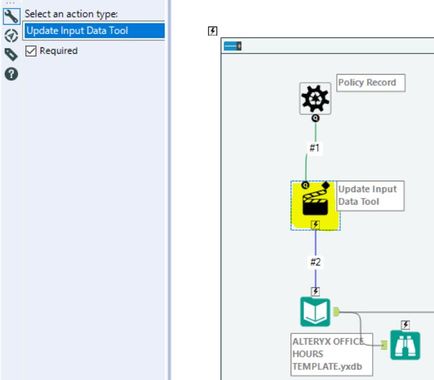 Batch Macro


