Hi All,
I am trying to Import two files
File1_28-02-2021 - With Two Tabs ( REGION and PROD)
File2_31-03-2021 - With Two Tabs ( REGION and PROD)
The only difference between these two files is I have an additional Colum 'REG' In File2_31-03-2021.
I followed the link posted by Andrew below to recreate the Macro with my two sample file as above and i can successfully combine the Data Set on to one single Data set.
https://community.alteryx.com/t5/Alteryx-Designer-Knowledge-Base/Read-in-Multiple-Excel-Files-with-M...
But is there a way to add a filter on my main workflow only to filter a specific sheet which are required for my analysis. I. don't want the filter to be applied in any of my macros.
I have attached the sample files with the two macros and my workflow.
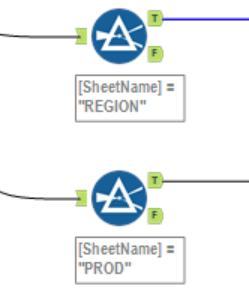
The ultimate goal is to filter the Required sheets in the Main workflow is there a way to apply the filters for specific sheet in the main workflow before combining all the data sets .
when i say filters for specific sheet i want to create two streams like below and this has to happen to before combining all the data sets.