ACT NOW: The Alteryx team will be retiring support for Community account recovery and Community email-change requests Early 2026. Make sure to check your account preferences in my.alteryx.com to make sure you have filled out your security questions. Learn more here
Start Free Trial

Alteryx Designer Desktop Discussions

Find answers, ask questions, and share expertise about Alteryx Designer Desktop and Intelligence Suite.

Assistance trying to use a template file for multiple outputs based on column values

bdoogan
6 - Meteoroid

I've seen multiple posts on here regarding the usage of blobs to accomplish this task but I'm having difficulty following along, so if someone can assist.  I've attached two files.  The first is the input data that is our data source.  The second file is the template I want to use for the output.  The goal is to create one output file for each Driver listed in the Input file.  The drivers are dynamic and can change from one period to the next.  The workflow should use the input file to populate the correct fields in the output file using the template.  This includes header data in cells B2 & B3 and detailed data beginning with cell A6 in the template file.  

7 REPLIES 7
Qiu
21 - Polaris
21 - Polaris

@Carolyn 
I believe you can help for this problem 😁.


Qiu
21 - Polaris
21 - Polaris

@bdoogan 
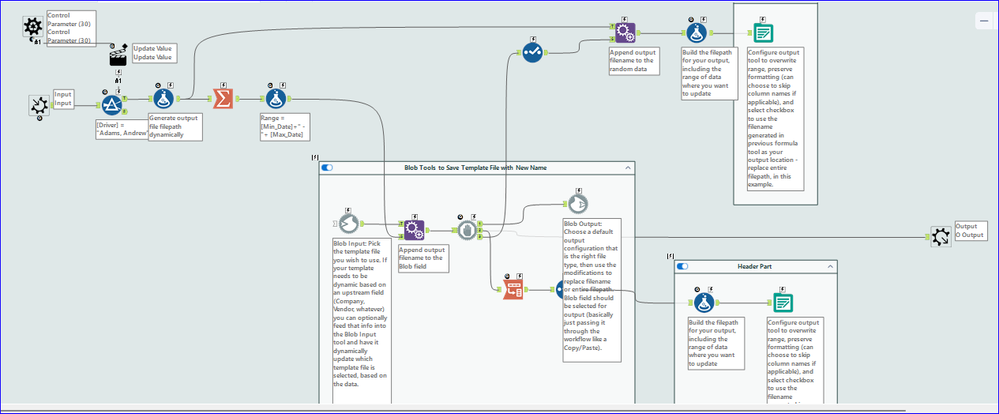
I refer this thread and put the workflow inside a Batch Macro so each drive gets an output.
https://community.alteryx.com/t5/Engine-Works/The-Blob-Reporting-That-Isn-t-From-a-Horror-Film/ba-p/...

0115-bdoogan-A.png0115-bdoogan-B.png
0115-bdoogan-C.png

bdoogan
6 - Meteoroid

I'm getting a message that this was created in a new version of Alteryx Designer but when I check for any updates it says I'm on the latest version.  I'm running version 2025.1.2.79.  Which version did you use to create this workflow?  Is there a similar solution for the version I'm running?

bdoogan
6 - Meteoroid

Actually even though I'm getting that version message, it appears to be working as expected.  Hopefully it doesn't break down the line but still curious what version was used to create this solution.  

Carolyn
12 - Quasar
12 - Quasar

Hey @bdoogan! 2025.2 came out in December and I would assume he's using that. As long as @Qiu didn't use any 25.2 features, you can open it 25.1 without losing anything. When you save, the workflow will adjust to your version and you won't see that message anymore.

bdoogan
6 - Meteoroid

Great.  Just trying to update what was provided with my existing real data model.  Hopefully all goes according to plan and I can mark this as resolved.  Will keep you updated.  

bdoogan
6 - Meteoroid

So I tried to migrate this solution to the folder and link it to my actual data set but am encountering an issue when running the .yxmd workflow.  See attached error messages.  When I run this workflow via the .ymxc file, it successfully creates the one sample file as expected.  Any ideas? 

Labels
Top Solution Authors