In case you missed the announcement: The Alteryx One Fall Release is here! Learn more about the new features and capabilities here
ACT NOW: The Alteryx team will be retiring support for Community account recovery and Community email-change requests after December 31, 2025. Set up your security questions now so you can recover your account anytime, just log out and back in to get started. Learn more here
Start Free Trial

Alteryx Designer Desktop Discussions

Find answers, ask questions, and share expertise about Alteryx Designer Desktop and Intelligence Suite.
SOLVED

Append Suffix Output Filename + Preserve Formatting

bakaidora
8 - Asteroid

Hello,


I would like to save my workflow into Excel where the Excel name contains the date of today. It works for me based on the attached screenshot.
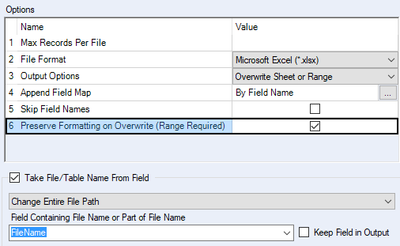
bakaidora_0-1616682401176.png


However, my additional request would be to preserve the formatting. It also works, if I overwrite an existing file but did not work in this case when I always save my workflow with a different name (because it is daily running and adding actual date to the file name).


Is there any solution with I can solve both issue: 1. Actual date in the file name and 2. preserve formatting?


Thanks for your help.

Dóra


2 REPLIES 2
Luke_C
17 - Castor
17 - Castor

Hi @bakaidora 


When I have this situation I've found success in maintaining a blank 'template' file with the formatting I want, and then having the workflow copy that template, output to it, and rename it. I use the run-command tools to do this. Check out my response on the below thread that has an example of how to do this. 


https://community.alteryx.com/t5/Alteryx-Designer-Discussions/Clearing-Data-in-Template-before-Overw...


bakaidora
8 - Asteroid

Thank you very much, this is a perfect solution for my issue. I marked your answer as a solution.

Labels
Top Solution Authors