Hey Community, I have built an Alteryx workflow and workflow resulted in output called Master Data, now I have to create a Macro in such a way that if we give the file name say (Data 1 Output) then columns from Master Data should flow into respective fields available in Data 1 output, if I wanted to choose Data 3 Output then Respective data fields from master data should flow into Data 3 output. any leads please help me.
Solved! Go to Solution.
@vinayvnn
Can your provide a sample input file and output?
Hi @Qiu, Thanks for your response.
I have already attached sample output on the post, and you can notice the output data under Master Data.
for your reference am attaching sample output below:
@vinayvnn
I mean in data format..😁
not picture...
@Qiu Apologies for the inconvenience.
Please see the output below:
Master Data Output:
| Master Data | ||||||||
| Sno | First Name | Last name | Geo Code | Reported Country | Country | Collection Period | Current Status | Date Received |
| 1 | Vin | wee | 101 | CN | India | Jun -Oct | Yes | 1st Oct |
| 2 | sup | qee | 102 | IN | London | Jun -Oct | No | 1st Oct |
| 3 | nvv | ree | 103 | KN | UK | Jun -Oct | Yes | 1st Oct |
| 4 | knn | tee | 104 | LN | USA | Jun -Oct | Yes | 1st Oct |
| 5 | enn | yeee | 105 | AN | Sweeden | J un -Oct | Yes | 1st Oct |
| 6 | fnn | uee | 106 | QN | Poland | Jun -Oct | Yes | 1st Oct |
| 7 | gnn | iee | 107 | IN | UK | Jun -Oct | Yes | 1st Oct |
| 8 | hnn | oee | 108 | MN | USA | Jan-Dec | Yes | 1st Jan |
| 9 | amm | pee | 109 | GN | Sweeden | Jan-Dec | Yes | 2nd Jan |
| 10 | snn | see | 110 | EN | Poland | Jan-Dec | Yes | 3rd Jan |
| 11 | knn | aee | 111 | QN | India | Jan-Dec | Yes | 4th Jan |
| 12 | lnn | kee | 112 | KSN | London | Jan-Dec | No | 5th Jan |
| 13 | unn | mee | 113 | PN | India | Jan-Dec | No | 6th Jan |
Data 1 output:
| Data 1 Output | |||||
| Sno | First Name | Last name | Geo Code | Reported Country | Country |
| 1 | Vin | wee | 101 | CN | India |
| 2 | sup | qee | 102 | IN | London |
| 3 | nvv | ree | 103 | KN | UK |
| 4 | knn | tee | 104 | LN | USA |
| 5 | enn | yeee | 105 | AN | Sweeden |
| 6 | fnn | uee | 106 | QN | Poland |
| 7 | gnn | iee | 107 | IN | UK |
| 8 | hnn | oee | 108 | MN | USA |
| 9 | amm | pee | 109 | GN | Sweeden |
| 10 | snn | see | 110 | EN | Poland |
| 11 | knn | aee | 111 | QN | India |
| 12 | lnn | kee | 112 | KSN | London |
| 13 | unn | mee | 113 | PN | India |
Data 2 Output:
| Data 2 Output | |||
| Sno | Collection Period | Current Status | Date Received |
| 1 | Jun -Oct | Yes | 1st Oct |
| 2 | Jun -Oct | No | 1st Oct |
| 3 | Jun -Oct | Yes | 1st Oct |
| 4 | Jun -Oct | Yes | 1st Oct |
| 5 | Jun -Oct | Yes | 1st Oct |
| 6 | Jun -Oct | Yes | 1st Oct |
| 7 | Jun -Oct | Yes | 1st Oct |
| 8 | Jan-Dec | Yes | 1st Jan |
| 9 | Jan-Dec | Yes | 2nd Jan |
| 10 | Jan-Dec | Yes | 3rd Jan |
| 11 | Jan-Dec | Yes | 4th Jan |
| 12 | Jan-Dec | No | 5th Jan |
| 13 | Jan-Dec | No | 6th Jan |
Data 3 Output:
| Data 3 Output | |||||
| Geo Code | Reported Country | Country | Collection Period | Current Status | Date Received |
| 101 | CN | India | Jun -Oct | Yes | 1st Oct |
| 102 | IN | London | Jun -Oct | No | 1st Oct |
| 103 | KN | UK | Jun -Oct | Yes | 1st Oct |
| 104 | LN | USA | Jun -Oct | Yes | 1st Oct |
| 105 | AN | Sweeden | Jun -Oct | Yes | 1st Oct |
| 106 | QN | Poland | Jun -Oct | Yes | 1st Oct |
| 107 | IN | UK | Jun -Oct | Yes | 1st Oct |
| 108 | MN | USA | Jan-Dec | Yes | 1st Jan |
| 109 | GN | Sweeden | Jan-Dec | Yes | 2nd Jan |
| 110 | EN | Poland | Jan-Dec | Yes | 3rd Jan |
| 111 | QN | India | Jan-Dec | Yes | 4th Jan |
| 112 | KSN | London | Jan-Dec | No | 5th Jan |
| 113 | PN | India | Jan-Dec | No | 6th Jan |
@vinayvnn
Thank you for the data input.
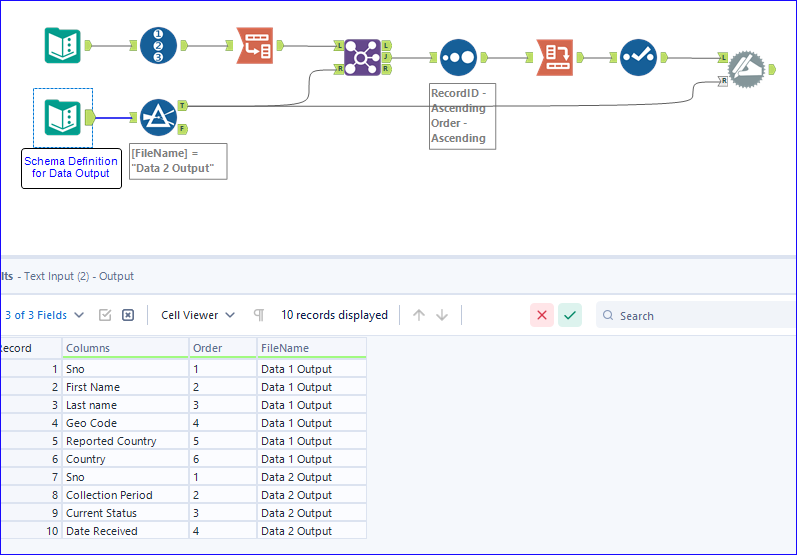
When you say "if we give the file name say (Data 1 Output) ", I assume there should be a Data File Schema Definition Input.
I made some data as attached,
Then we can filter which output we need, and output the data as the selected output data schema.
@Qiu Thanks very much for your help, output is as expected :)
@vinayvnn
Happy to be helpful.