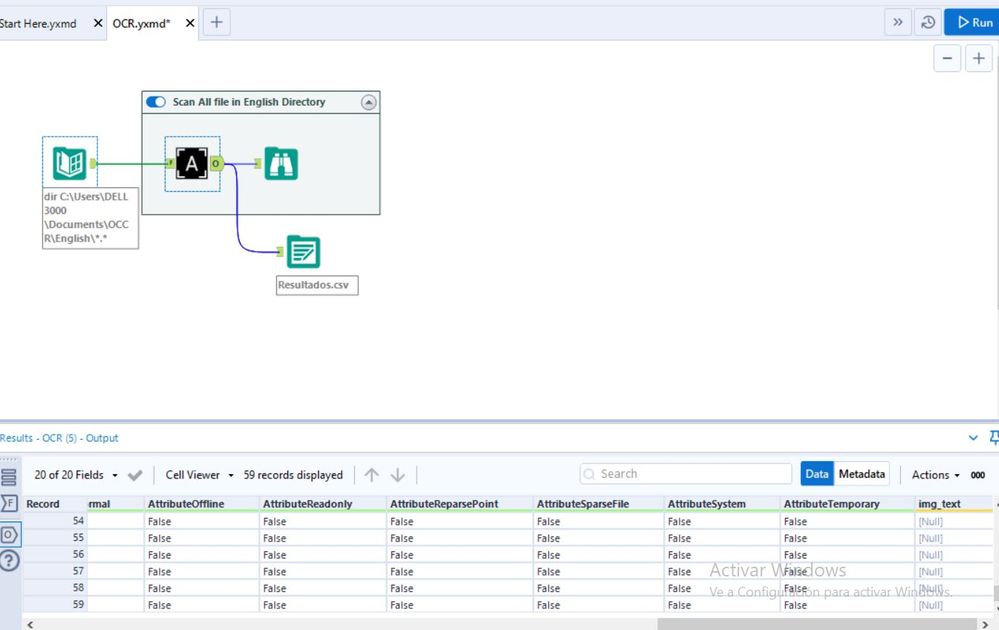
Hi All
Just tought i could share this tools i made with you All based on this post :
https://community.alteryx.com/t5/Alteryx-Designer-Discussions/Is-anybody-using-OCR-optical-character-reader-in-a-workflow/m-p/60938#M22196
I made this tools using python pytesseract library but for using this tools first you will need to install tesseract OCR first to get the languange library from https://github.com/UB-Mannheim/tesseract/wiki
For now i put the tesseract OCR default library folder in python code at C:\Program Files\Tesseract-OCR (since alteryx will be installed in 64 bit windows,it should be same for all windows user that has default C folder),feel free to change it if it was needed in the python code
Also,i put the image sample in English.rar to see which file that could be scanned and which file cannot (will return null)
Nice, I'll have to compare this to the tesseract macro I made in R!
I ran the Tesseract OCR installer but I'm getting a "library not installed" error when I try to run this. What am I missing?
Hi @MDOstroff
was there more complete message on what library you're missing? i have installed 'tesseract','pytesseract' and 'Image' library for my python environment (for Alteryx) before installing tesseract OCR,I hope this could help
Thank you
This looks really cool. Perhaps i'm getting in a little over my head but I'm having trouble interpreting my errors as i'm not strong with Python. I am on Designer x64 and the github download is in the correct location. Errors are below... I do have pip and i'm unclear what 'PIL' is but i don't see it in Tessereact-OCR.
Error: Python (1): ---------------------------------------------------------------------------CalledProcessError Traceback (most recent call last)<ipython-input-1-94adb072d5fc> in <module>56 if Package.isPackageInstalled("pytesseract") == False:----> 7 Package.installPackages(['tesseract','pytesseract'])c:\program files\alteryx19.2\bin\miniconda3\pythontool_venv\lib\site-packages\ayx\Package.py in installPackages(package, install_type, debug)112 print(pip_install_result['msg'])113 if not pip_install_result['success']:--> 114 raise pip_install_result['err']c:\program files\alteryx19.2\bin\miniconda3\pythontool_venv\lib\site-packages\ayx\Utils.py in runSubprocess(args_list, debug)4849 try:---> 50 result = subprocess.check_output(args_list, stderr=subprocess.STDOUT)51 if debug:52 print("[Subprocess success!]")C:\Program Files\Alteryx19.2\bin\Miniconda3\lib\subprocess.py in check_output(timeout, *popenargs, **kwargs)334335 return run(*popenargs, stdout=PIPE, timeout=timeout, check=True,--> 336 **kwargs).stdout337338C:\Program Files\Alteryx19.2\bin\Miniconda3\lib\subprocess.py in run(input, timeout, check, *popenargs, **kwargs)416 if check and retcode:417 raise CalledProcessError(retcode, process.args,--> 418 output=stdout, stderr=stderr)419 return CompletedProcess(process.args, retcode, stdout, stderr)420CalledProcessError: Command '['c:\\program files\\alteryx19.2\\bin\\miniconda3\\pythontool_venv\\scripts\\python.exe', '-m', 'pip', 'install', 'tesseract', 'pytesseract']' returned non-zero exit status 1.
and
Error: Python (1): ---------------------------------------------------------------------------ModuleNotFoundError Traceback (most recent call last)<ipython-input-2-b47efc3914ed> in <module>1 from ayx import Alteryx----> 2 from PIL import Image3 import pytesseract45 pytesseract.pytesseract.tesseract_cmd = r'C:\Program Files\Tesseract-OCR\tesseract'ModuleNotFoundError: No module named 'PIL'
Thank You for your help.
Cheers,
Jack
Hi @jstewart
Aah sorry, looks like pillow was not default library from python, i already have the library when build this tools so i didn't realize about it,
you can run this workflow to install pil library and then try to run the tools again,let me know if you have another trouble when trying to run the OCR tool
Cheers
Welly
@Idyllic_Data_Geek yes, this tool should provide the basic capability to scan image text, thought not as advanced as Alteryx intelligence suite, haha
All my img_text results are Null. Is this correct?
Hi @paredesg, can you send me 1 sample image?
I am not able to run like some others have posted. I am running the non-admin version of Alteryx Designer and my installation of tesseract is in a different path, so that is all I changed. I'm not a coder/programmer and a novice with Python. The error I get is as follows:
Error: OCR (5): Tool #1: ---------------------------------------------------------------------------RuntimeError Traceback (most recent call last)<ipython-input-2-a7b0f53046c8> in <module>5 pytesseract.pytesseract.tesseract_cmd = r'C:\Users\username\AppData\Local\Tesseract-OCR\tesseract'6----> 7 img_list = Alteryx.read("#1")8 img_text = []9c:\users\username\appdata\local\alteryx\bin\miniconda3\envs\designerbasetools_venv\lib\site-packages\ayx\export.py in read(incoming_connection_name, debug, **kwargs)33 When running the workflow in Alteryx, this function will convert incoming data streams to pandas dataframes when executing the code written in the Python tool. When called from the Jupyter notebook interactively, it will read in a copy of the incoming data that was cached on the previous run of the Alteryx workflow.34 """---> 35 return __CachedData__(debug=debug).read(incoming_connection_name, **kwargs)3637c:\users\username\appdata\local\alteryx\bin\miniconda3\envs\designerbasetools_venv\lib\site-packages\ayx\CachedData.py in read(self, incoming_connection_name)304 try:305 # get the data from the sql db (if only one table exists, no need to specify the table name)--> 306 data = db.getData()307 # print success message308 print("".join(["SUCCESS: ", msg_action]))c:\users\username\appdata\local\alteryx\bin\miniconda3\envs\designerbasetools_venv\lib\site-packages\ayx\Datafiles.py in getData(self, data, metadata)498 if data is None:499 # read in data as a list of numpy ndarrays--> 500 data = self.connection.read_nparrays()501 # check if data is a list of numpy structs502 elif isinstance(data, list) and all(RuntimeError: DataWrap2WrigleyDb::GoRecord: Attempt to seek past the end of the file