The Alteryx Community is a finalist in three 2026 CMX Awards! Help us win Customer Support Community, Most Engaged Community, and User Group Program of the Year - vote now! (it only takes about 2 minutes) before January 9.
ACT NOW: The Alteryx team will be retiring support for Community account recovery and Community email-change requests Early 2026. Make sure to check your account preferences in my.alteryx.com to make sure you have filled out your security questions. Learn more here
Start Free Trial

Alteryx Designer Desktop Discussions

Find answers, ask questions, and share expertise about Alteryx Designer Desktop and Intelligence Suite.
解決済み

Adding more rows to column field names

Mwatts23
アステロイド

Hi,

I would like to seek your help regarding adding more rows in the column field names.

I was exploring the Cross Tab tool but it is not working for me in stacking 3 fields as column names.

Below is the screenshot of the sample data and the expected output. I also attached the xlsx file for reference.
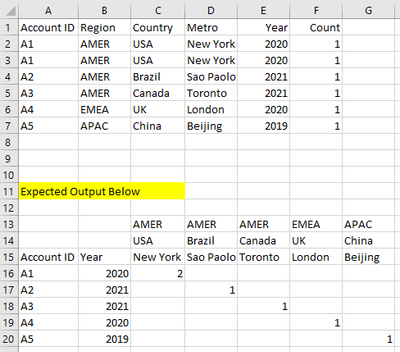
 

Mwatts23_0-1666375582540.png


 Please let me know if you have any clarifications on my query. Thank you.


Best regards,

Michael


10件の返信10
bkurt
アステロイド

You can either concatenate the string values or you can create rows and add them with a join tool. I think the file in the attachment should help you out.

Mwatts23
アステロイド

Hi @bkurt ,


Thank you so much for the quick response. Is it possible to add the "Year" next to the Account ID? Like the one in my desired output on top. 


Best regards,

Michael

bkurt
アステロイド

Hi @Mwatts23 ,


You're welcome. I added a version below that gives the values as you require.

If it is what you want, I would be very happy if you gave me my first solution badge :).


Best regards,

Bora

Mwatts23
アステロイド

Hi Bora,


WoW! Thank you so much! this helps a lot.

I hope you can clarify, for example, I have a 100,000 rows do I still have to keep the same N number in both Sample Type Tool?

May I know what is the purpose of the Sample Type in the workflow?

Mwatts23_0-1666385956450.png

Best regards,

Michael

bkurt
アステロイド

Hi Michael,


The use of the sample tool was to cut out the part after "expected output below" that was in the excel you provided.

You can leave it out other files.

If your file has a lot of duplicates, you might want to replace the second sample tool with a unique tool.


Kind regards,

Bora

binu_acs
ポラリス

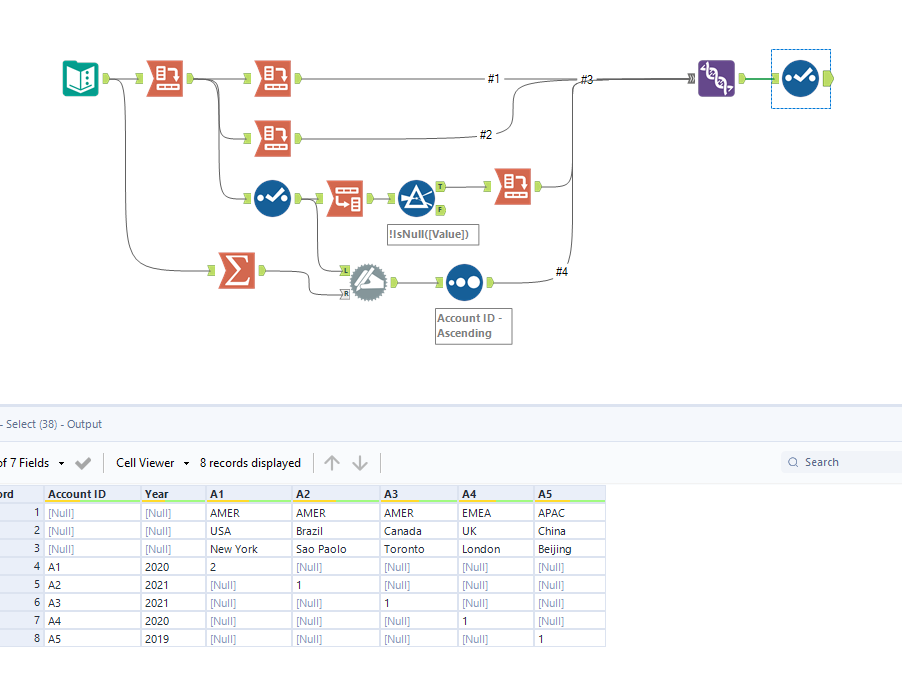
@Mwatts23 One way of doing this


binuacs_0-1666387381326.png


Mwatts23
アステロイド

So, the First Sample tool that has N=6, I can just leave as it is even I have a thousands of rows?

If I have a lot of duplicate Account Ids, will that affect the first Sample tool if I don't use a unique tool?


Thank you for the information you are sharing Bora, this is super helpful.


Best regards,

Michael

bkurt
アステロイド

You should not leave the sample tools in. Those were only necessary in the excel file you delivered earlier.

Mwatts23
アステロイド

Thank you @binu_acs for sharing your workflow. This is very useful as well.


Best regards,

Michael

ラベル
トップのソリューション投稿者