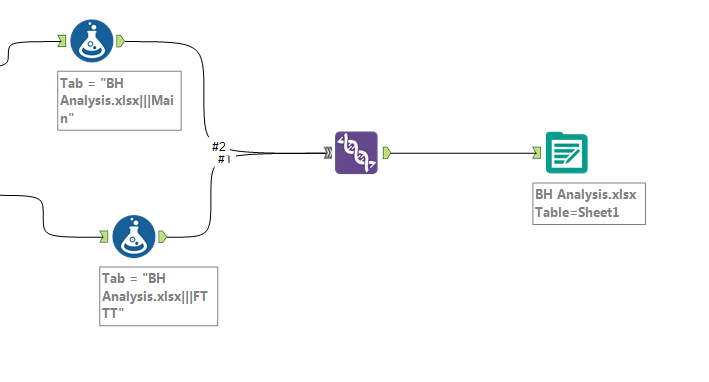
I need a way to add a date/time stamp to an output file. For example I would want it named "BH_Analysis_Date-Time". I can do this by using the bottom area called "take file/table name from field" of the output data tool but im currently using it to take 2 outputs to create a workbook with 2 sheets. I've tried both methods in the link but still can't figure out how to do it. I think the issue i'm having with both is it can only use 1 sheet of an input. There has to be an easier way to do this. Any help would be appreciated
https://community.alteryx.com/t5/tkb/articleprintpage/tkb-id/knowledgebase/article-id/668
https://community.alteryx.com/t5/tkb/articleprintpage/tkb-id/knowledgebase/article-id/347
If I understand correctly, you're wanting to change the file name using datetime stamp AND change the tab name based on the which branch it comes from, correct?
One option would be to use a formula to concatenate the whole file path (including distinct sheet name) before feeding into the Output tool. For example, your full FilePath field in the Formula tool could be something like:
"{File location}\BH_Analysis_" + ToString(DateTimeFormat(DateTimeToday()),"%Y%m%d") + ".xlsx|||" + [SheetName]
Then you can choose to "Change Entire FilePath" in the Output tool, and it should output to the new file (with date added to filename) by tab (designated by the different sheetnames).
See attached for a simple example! Let me know if that works
Cheers,
NJ
This worked perfectly, thank you so much. I modified it slightly but it worked great.
"C:\Users\rtl\Documents\Alteryx Evaluation\Woohoo\"+"BH Analysis." + ToString(DateTimeFormat(DateTimeNow(),"%Y-%m-%d.%H-%M-%S")) +".xlsx|||" + [SheetName]
One last question. This works great except both sheets have the same columns. For example: I want it to look like the columns below with the 2nd Sheet having columns E and F removed. What's happened though is columns A-F are all present for both sheets. In the 2nd branch I inserted a select tool and removed the 2 columns I didn't want but it doesn't work. Is there a way to do this?
1st Sheet
2nd Sheet