The Alteryx Community is a finalist in three 2026 CMX Awards! Help us win Customer Support Community, Most Engaged Community, and User Group Program of the Year - vote now! (it only takes about 2 minutes) before January 9.
ACT NOW: The Alteryx team will be retiring support for Community account recovery and Community email-change requests Early 2026. Make sure to check your account preferences in my.alteryx.com to make sure you have filled out your security questions. Learn more here
Start Free Trial

Alteryx Designer Desktop Discussions

Find answers, ask questions, and share expertise about Alteryx Designer Desktop and Intelligence Suite.
GELÖST

Add different combinations of row values

rickydata
Meteor

I have the following data


Item    | code

item 1 | A

item 1 | B

item 1 | C


But I want to combine codes with a different combination of other codes for the same item


Item    | code

item 1 | A

item 1 | B

item 1 | C

item 1 | AB

item 1 | AC

item 1 | BA

item 1 | BC

item 1 | CA

item 1 | CB


4 ANTWORTEN 4
AGilbert
Bolide

Should AA, BB and CC be included in the output or not?


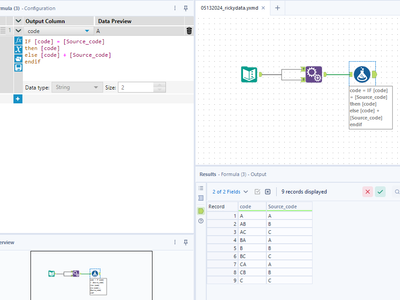
Edited: The attached workflow matches your output. If you want the AA, BB, and CC values just remove the conditional expression and replace it with the concatenation of the code and source fields. 


Screenshot 2024-05-13 161505.png

rickydata
Meteor

I should have mentioned that the first column could have mulitple values and the code field could have varying values.  


Let me attach an example. 


AGilbert
Bolide

Iterative macro attached which applies the same logic as before but to each group in order.


FYI the max iterations is set to 100 by default but can be changed in Interface Designer -> Properties.


I made the assumption that your groups are literally called '1' and '2' and used those values to match to the iteration number of the macro (see filter tool). If you're actually passing strings as test names, we will need to refactor a little. 


macro.png

rickydata
Meteor

This worked almost to perfection thanks!!!! 

Beschriftungen
Top-Lösungs-Autoren