Hello, everyone,
I am seeking for your guidance in regards to exporting some data in Excel, in two different sheets of the same file.
I am starting from one Input file and then there are two ramifications of this:
1. There is a Sample tool on first 3 rows (just to give an example - the thing is that there is a data manipulation)
2. Summarize the results and create a Basic table to show it in a nice format
Now I want each of the above to be in different sheets, but in the same Excel file, 1 - to be in Sheet 1 and 2 - to be in Sheet 2.
I managed to find out how to export a Basic Table in Excel (as I have seen many replies where this would be not possible) - using a Render tool, this will be exported in a temporary Excel file.
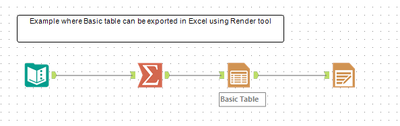
And it is being exported like this:
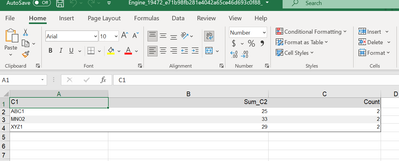
But the challenge is I do not know how to combine with the other data for them to be in the same Excel file.
In order to output two different datasets in same Excel file, I have seen there should be a column created with "Sheet name" and in the Output configuration I would take file/table name from this column and unticking the box of "Keep Field in Output". This works for normal datasets, but not when containing a Basic Table.
This is how I tried.
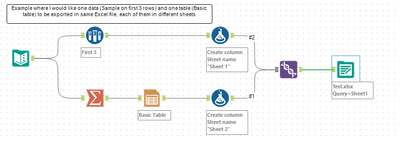
But the export looks like this:
Sheet 1 (which is fine, this is how it should look like):
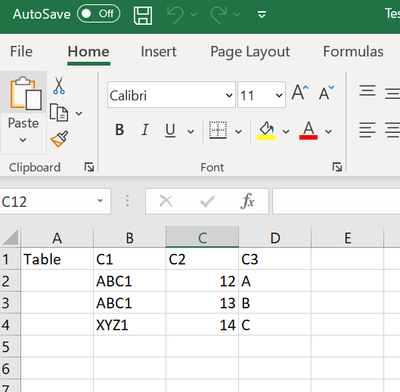
But Sheet 2 does not show the exact table that I want, like previously shown:
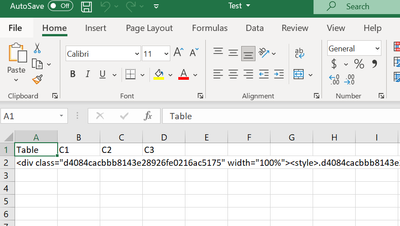
Is there a way I could do it?
I am also attaching the Alteryx workflow.
Thank you in advance!


