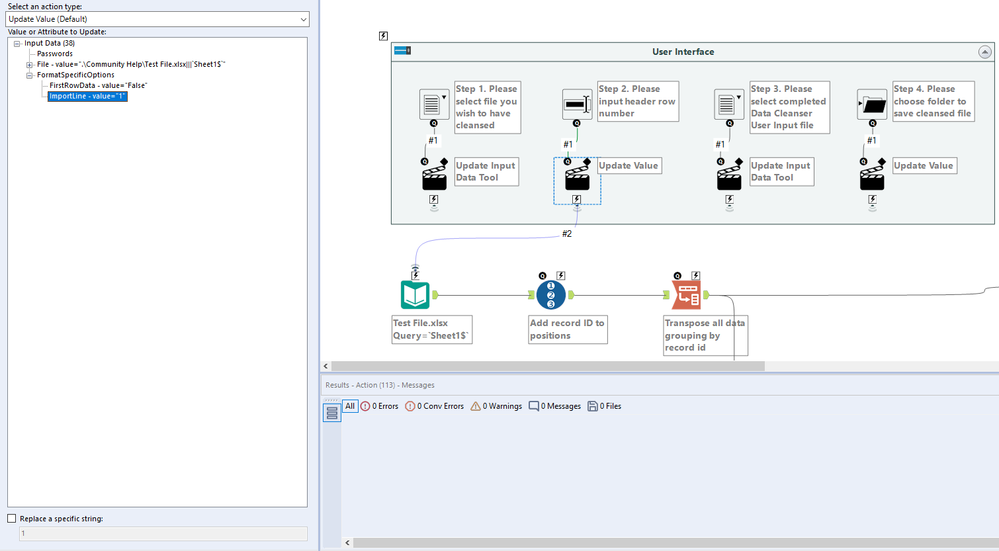
I have an analytic app that anonymises specified columns in an excel file for a user. When the app is run the user is given the four options in fig.1 below. In step 1 they select the file they wish to have anonymised, in step 2 they indicate which row number the headers are in (as the headers may not always be in the first row), in step 3 they input a second .xlsx file which contains the column headers for the columns they want anonymised, and in step 4 they choose a destination to save the output. I use a file browse tool and a text box tool accompanied by action tools for steps 1 & 2 to allow the user to choose their file and update the data import line for the purpose of the app, see fig. 2.
My issue is that originally I only allowed .xlsx files to be used as inputs into step 1 however now I would like .csv & .xlsm apps to be used. I updated the Arbitrary File Specification to allow for .csv & .xlsm type files in step 1 however step 2 in the app doesn't seem to work for the csv & xlsm file types. If I input a .csv or .xlsm file into step 1, the data import always starts on row 1 regardless of what row number I have put into step 2. Is there a way that will allow me to change the data import start line regardless of which three file types are used?
Thanks in advance for any help!
Fig.1
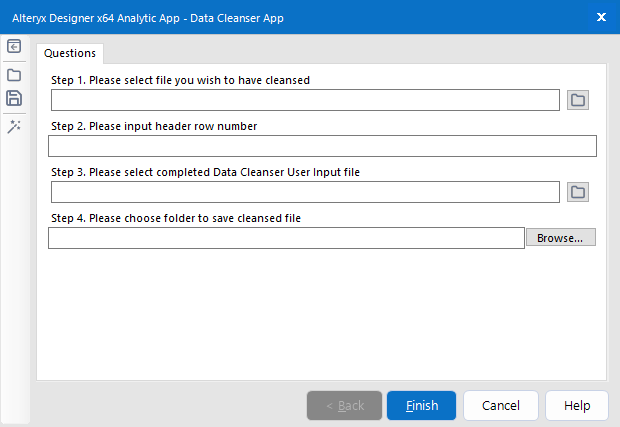
Fig. 2