Hello
I am hoping to get some guidance.
I have a data set with a single column that combines Year/Month (data type: V_String). See Figure 1 below.
I need to split out the Year/Month into 2 columns - Year and Month.
This is simple enough with the text to columns tool.
Where it gets tricky is trying to populate the rows after the first row.
I have tried using the multi-row tool, but I get stuck
Figure 1.
| Row Number | Month | Region | DATA |
| 1 | 2022/Jan | ACT - Metro | 0 |
| 2 | | ACT - Rural | 0 |
| 3 | | New South Wales - Metro | 0 |
| 4 | | New South Wales - Rural | 0 |
| 5 | | Northern Territory - Metro | 0 |
| 6 | | Northern Territory - Rural | 0 |
| 7 | | Queensland - Metro | 0 |
| 8 | | Queensland - Rural | 0 |
| 9 | | South Australia - Metro | 0 |
| 10 | | South Australia - Rural | 0 |
| 11 | | Tasmania - Metro | 0 |
| 12 | | Tasmania - Rural | 0 |
| 13 | | Victoria - Metro | 0 |
| 14 | | Victoria - Rural | 0 |
| 15 | | Western Australia - Metro | 0 |
Step 1.
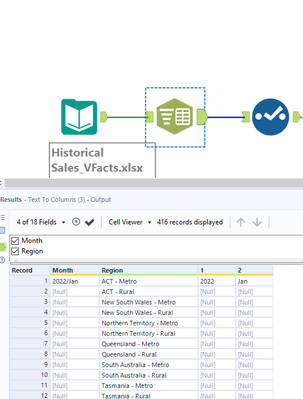
Its trying to configure the multi-row tool with the correct condition function that is where I am struggling
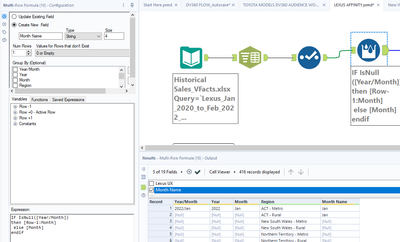
I think the problem is coming in with my Expression:
IF IsNull([Year/Month])
then [Row-1:Month]
else [Month]
endif
Please let me know if anyone has a solve for this?


