Hi Everyone,
For the output tool, going to an Excel file, how does using Alteryx overwrite sheet or range function impact how OneDrive drive stores the data.
Question 1. How can the core OneDrive version history be retained for file where the output is set to overwrite an excel sheet?
Question 2. How will this work on a normal network drive??
Thinking in manual steps, I'm wondering if Alteryx behind the scenes open the specified excel file, overwrites the intended sheet, and then saves the file as a brand new .xlsx file overwriting the prior version. Same filename, same Alteryx update, but no version history. This seems like the effect you might get if you copied a backup copy with the exact same name from another folder manually, and saved it in the existing "live" folder being used by the process. If you did this manually, it would probably warn you that the filename already exists and ask you if you want to replace the existing file.
Compare this to opening the existing file, updating the specified sheet, and performing a save function with the existing filename. Same filename, same Alteryx update and version history is retained.
Why is this important?
- It appears that Alteryx is losing important backup copies normally available in OneDrive.
- Today, I needed one of those backups. It is not there and I've noticed this issue before.
- The output files are being saved in Excel on OneDrive. All of the workflows are configure to overwrite the named sheet in the .xlsx file.
- The excel file has additional sheets in it that refer to the sheet Alteryx overwrites when the program is run.
- The workflows all run without errors.
- Version history is not available in OneDrive for the files where Alteryx overwrites the sheet. I expected to see last weeks versions in the history.
- Version history is working in OneDrive for other files that are not touched by Alteryx.
- My goal is to be able to use prior versions of the output files from earlier runs that day, or in prior days, as backup files to the process.
I appreciate any input or suggestions. Further details below.
Thanks,
John
Details.
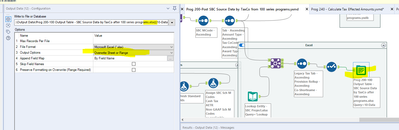
- Screenshot 1 has my output file settings in Alteryx.
- All the workflows are configured following the same approach. The file is output to excel, and the specifically named sheet is overwritten. All of the other worksheets in the excel file remain intact after each workflow is run.
- To see prior versions, in OneDrive right click on file name in OneDrive, and choose version history from the dropdown.
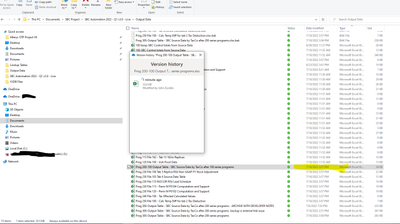
- Screenshot 2 shows the version history after running the Alteryx workflow
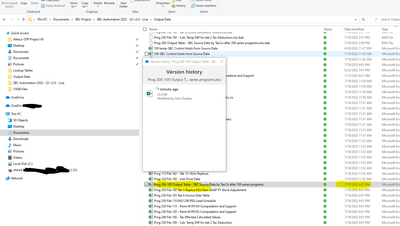
- Screenshot 3 shows the version history after running Alteryx workflow a few minutes later.
- Notice that the One Drive version history does not seem to maintain the earlier versions.
- Each workflow uses the same concept to create the output files in excel. All the workflows are set to output to excel, and overwrite the sheet or range.
- I'm currently the Alteryx development stage and have been running the workflows multiple times every day for the past couple of weeks. None of copies from last week are available as a backup from last week for example, when there should be multiple versions.
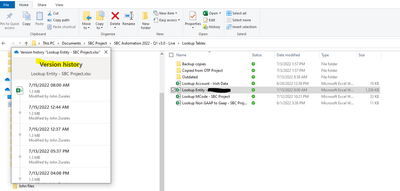
- Screenshot 4 shows that One Drive preserves the version history for other files not going through this Alteryx process. This tells me it is not a OneDrive setting or issue.
- Access to a copy of earlier versions is part of the expected outcome.
Screenshot 1 - Output tool configuration
Screenshot 2 - I ran the Alteryx program. This is what One Drive version history shows.
Screenshot 3 - I ran the programs again a few minutes later. Here is the new One Drive version history.
Screenshot 4 - This is how version history looks in the folder that contains the lookup tables that I manually make changes to. This is what I expected the Output data version history to look like. If needed, I could restore the version from last week, which is not the case in Screenshots 1 and 2.