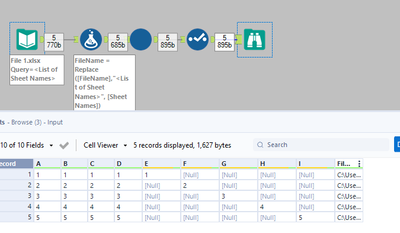
I am currently working on data in multiple excel tabs.
I have successfully cleaned and formatted the dataset for 1 tab with a current workflow.
However, I have multiple tabs which I want to combine them into 1 spreadsheet using Alteryx. However, I do not know of the fastest and efficient way of doing this because Alteryx's input data only takes in 1 tab at a time. I have more than 50+ different tabs (countries) to clean and format the data. I would like to combine them into 1 spreadsheet.
Current data format:
| | 2021 | 2020 | Variance | ... (more columns) | Variance % |
| Revenue | | | | | |
| IT Cost | | | | | |
| ... (more rows) | | | | | |
| Other Costs | | | | | |
 (sample, there are more than 50 tabs to merge together)
Desired data format:
| | 2021 | 2020 | Variance | ... (more columns) | Variance % |
| Revenue | | | | | |
| IT Cost | | | | | |
| ... (more rows) | | | | | |
| Other Costs | | | | | |
with the other countries' data tab combined into 1 spreadsheet.
Is there an optimal way of doing this? Kindly seek help and understanding 😊