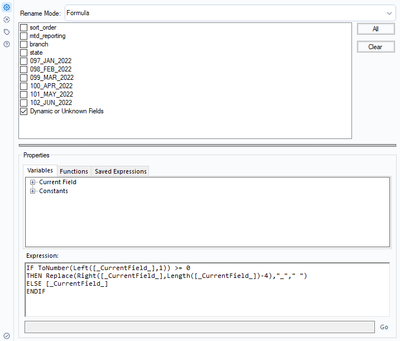
I have a situation where I need to dynamically rename some columns that but not others. The challenge arises because the columns I want to change are month/year that change month to month. I need to dynamically the first image of columns to look like the second image. Any logic I try to use in the expressions field does nothing. In all cases the tool accepts the expression, but the expression is ignored. In all cases, the
Here are a few I have tried to no avail.
a. IIF([_CurrentField_] IN ("sort_order","mtd_reporting","branch","state"),[_CurrentField_],Replace(Right([_CurrentField_],Length([_CurrentField_])-4),"_"," "))
b. IF [_CurrentField_] IN ("sort_order","mtd_reporting","branch","state") THEN [_CurrentField_]
ELSE Replace(Right([_CurrentField_],Length([_CurrentField_])-4),"_"," ")
ENDIF
c. IF ToNumber(Left([_CurrentField_],1)) >= 0
THEN Replace(Right([_CurrentField_],Length([_CurrentField_])-4),"_"," ")
ELSE [_CurrentField_]
ENDIF
If I manually check all the dated columns and none of the others, it works fine. But that's not "dynamic" in the way I need it.
What am I doing wrong?
From this...

To this...

Configuration: