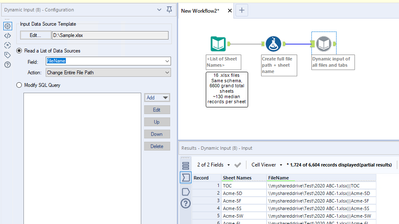
One of my users has a workflow with a relatively small amount of Excel files, but hundreds of tabs within each file (per below comment tool) for a total of about 6,600 tabs to read. Grand total, it's probably about 700,000 records, which generally processes in minutes for other use cases, but of course this configuration is much different from other ones I've seen.
At a small scale, the dynamic input runs fine after reading about 100 or so tabs at a rate about 1-2 sheets per second. But after that point, processing speed plummets to roughly 30 seconds per sheet. I'm fairly certain it has to do with Alteryx treating each tab as needing to close and reopen each file for every record, which kills the system. I'm calculating the workflow would take about 5-8 hours to run, which is not viable, since we need to target <20 minutes for my organization's Gallery policy.
Ordinarily, the workflow would run on a shared drive, but even through my local drive, it's still taking just as long.
I'm wondering if there's better logic I can use to perhaps trick Alteryx into understanding that we're dealing with a relatively small amount of data. Maybe a macro? I'm pretty good at designing batch macros, but I don't really have any good ideas that would address this issue. Changing the source files' format itself isn't an option, unfortunately. Thanks in advance for anyone's support.