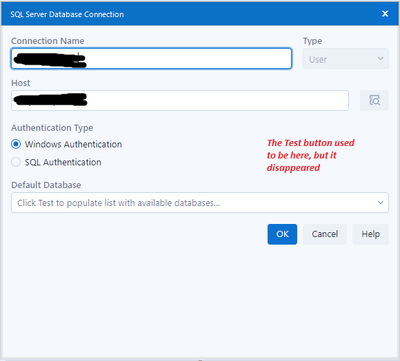
I typically query my company's databases using the Input Data tool. (I don't have write privileges, so I don't use the gray In-DB tools -- only the green Input Data tool.) Before I recently upgraded to Alteryx 2021.2, in the SQL Server Database Connection pop-up window, after I selected the connection name and host (the name of our server), I had an option to "Click Test to populate list with available databases." I liked this Test button because I could find the relevant database and point my SQL query to that database, avoiding the need to write long database prefixes and table names without aliases (e.g. DataWarehouse.dbo.DimensionTable....). Now that I've upgraded to Alteryx 2021.2, this Test button is no longer there under the Windows Authentication option. I see it under the SQL Authentication option, but I always authenticate with my Windows credentials, and that's where I'm used to seeing the Test button appear. Does anyone have any advice? How can I point to a specific database if this Test button isn't there? Writing "USE [Database Name]; GO" at the top of my query doesn't work in Alteryx like it does in SQL Server Management Studio.